An AI chatbot slow to respond almost always has a slow pipeline, not a slow model. Every reply crosses 5 stops, and 1 or 2 of them own most of the wait.
The usual hidden cost is conversation history the bot resends with every message, so each reply gets heavier than the last.
Timing all 5 stops takes about 30 minutes. The Nielsen Norman Group’s response-time limits explain the stakes: users lose flow near 1 second and attention near 10.
Quick answer: An AI chatbot slow to respond has 1 of 5 causes: a heavy chat window, a slow backend or cold start, slow retrieval or tool calls, an oversized prompt or reasoning-heavy model, or a stream that never streams. Timestamp each stop, fix the biggest, then stream the answer.
Key takeaways
- AI chatbot latency is fixed by timing 5 stops, not by swapping models.
- Time to first token (the wait before the first word) and total chatbot response time are separate problems. Streaming fixes the first. Shorter answers fix the second.
- An AI chatbot slow to respond that streams all at once usually has a proxy buffering it.
- API libraries retry silently, and a late-answered WhatsApp webhook gets resent, so 1 slow reply can hide a duplicate.
Owners and users need different fixes for an AI chatbot slow to respond
Owners who run a chatbot on a website, WhatsApp or phone line should trace the 5 stops below.
Users of ChatGPT, Claude or Gemini get only a few checks, because the provider controls the rest. Providers publish no per-stop numbers.
If you only use ChatGPT, Claude or Gemini, try these in order:
- Check the provider’s status page for an incident.
- Open a new chat, because a long chat carries more history.
- Test in a private window with extensions off, on another network and without a VPN.
OpenAI’s help center lists these checks and says long chats now load in sections.
The 5-stop reply path: where an AI chatbot slow to respond loses time
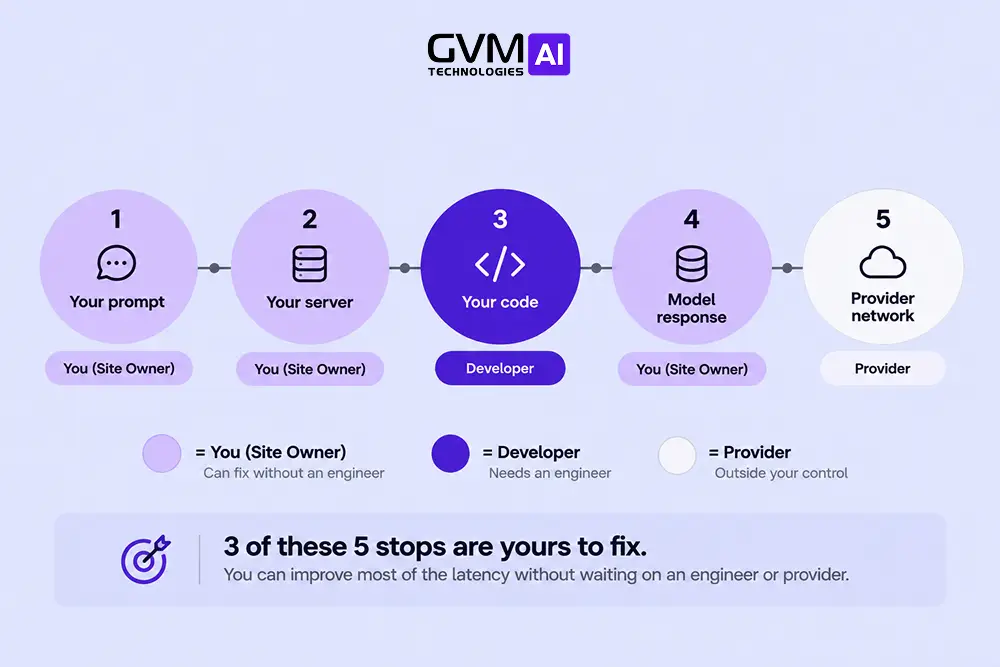
Every reply crosses 5 stops: the chat window, your backend, retrieval and tools, the model, and delivery. Total chatbot response time is the sum of all 5.
Timing each stop on 1 slow reply shows which stop owns the delay.
The 5 stops and who fixes each
| Stop | What it covers | Who fixes it |
|---|---|---|
| 1. Chat window | Widget and network | Site owner |
| 2. Backend | Prompt building, service calls | Developer |
| 3. Retrieval and tools | Document search, CRM and catalog calls | Developer |
| 4. Model | Queueing, reading, reasoning, writing | Owner sets it, provider owns capacity |
| 5. Delivery | Words reaching the customer | Developer or platform |
Many owners struggle because they see only the total. They blame the provider, switch models among GPT, Claude or Gemini and see no change.
The Timestamp Test: measure AI chatbot latency in 30 minutes
- Pick 1 slow real conversation. Repeat its last message in a fresh chat as a control.
- Log 5 timestamps: sent, received by your server, retrieval and tools done, time to first token, last token sent.
- Subtract neighboring timestamps to get 5 durations.
- Call the model API directly with the same prompt. A similar time blames the prompt or provider. A much faster time blames your pipeline.
- Repeat 10 times and note the slowest 2, because an average hides the 1-in-20 spike.
In practice: Run the test at a quiet hour and at your busiest. A gap between the 2 runs points at queueing, not your code.
Example, with invented numbers:
| Stop | Seconds |
|---|---|
| Chat window, network and backend | 0.6 |
| Retrieval and reranking | 1.1 |
| Safety check by a second model call | 0.9 |
| Model, time to first token | 0.8 |
| Model, writing the answer | 4.5 |
| Total wait | 7.9 |
| First word appears at | 3.4 |
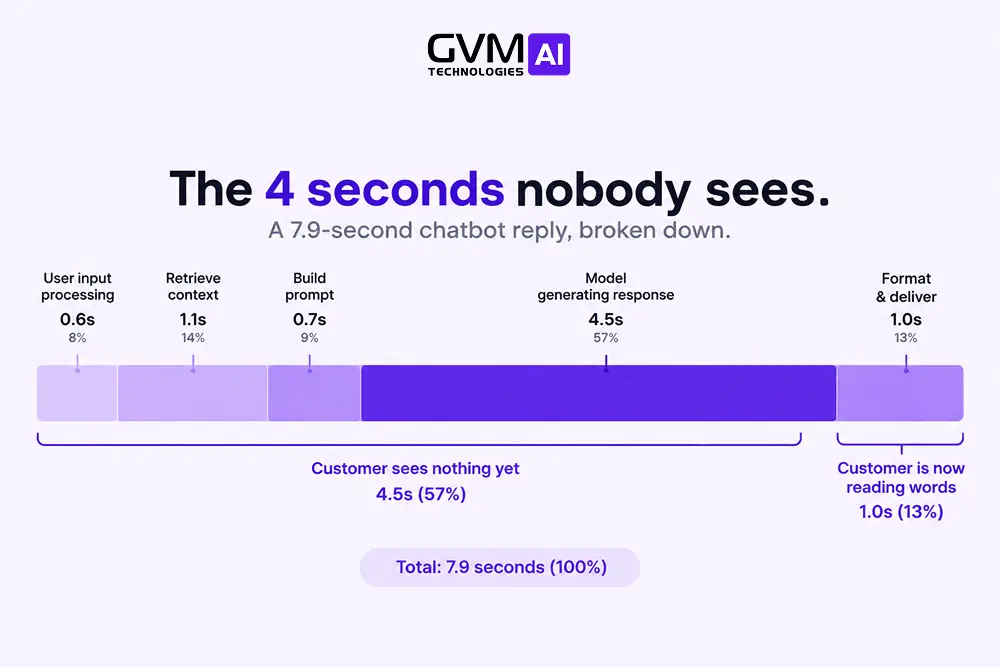
Retrieval and the safety call add 2.0 seconds before the answer starts. Streaming shows the first words at 3.4 seconds, and a shorter answer cuts the 4.5.
Symptom-to-stop map for an AI chatbot slow to respond
| What you see | Likely stop | First check |
|---|---|---|
| First message after a quiet spell is slow | Cold start or expired prompt cache | Compare the first and second message |
| Replies slow as the chat grows | Model, history resent | Ask the same question in a fresh chat |
| Slow at the same hours daily | Provider queueing or limits | Log status codes and retries |
| Slow on order or stock questions | Retrieval and tools | Time that API call |
| Text arrives all at once | Streaming off, or a proxy buffering | Test the stream without the proxy |
| 1 reply in 20 is far slower | Retry, timeout or cold path | Track the slowest 5% |
| WhatsApp replies arrive late or twice | Webhook answered too slowly, message resent | Acknowledge first, then process |
A bot that slows down only under real traffic is the same bot that fails with real customers after a clean demo.
Stops 1 to 3: fixing an AI chatbot slow to respond in the window, backend and retrieval
Owners fully control stops 1 to 3. Test the widget alone, reuse connections, remove cold starts and sequential calls, and shrink what retrieval hands to the model.
None of these fixes needs a new provider or a bigger model.
Chat window and backend: widget weight, cold starts and extra hops
- Widget weight: a heavy chat script slows the page, not the model, yet customers call both a slow AI chatbot. Block the script in developer tools and reload to test.
- Cold starts: scale-to-zero hosts sleep when idle, so the first message after a quiet spell pays start-up time. Keep 1 instance warm.
- Connection reuse: a new HTTPS connection per model call repeats DNS and TLS set-up, so create the client once. Run customer, order and stock lookups together.
- Extra hops: each no-code step adds a network round trip and a queue. GVM Technologies AI builds custom Python middleware instead of no-code wrapper chains, which removes hops.
Retrieval, tool calls and chained model calls in a slow AI chatbot
Retrieval search is often quick, so the wait comes from what follows.
- Send fewer chunks. Retrieval-Augmented Generation (RAG) answers from your documents, and the model reads every chunk first. The top 3 to 5 usually beat the top 20, and a reranker is a model call too.
- Cache hot answers. A semantic caching study reported hit rates of 61.6% to 68.8% and over 97% accuracy on hits.
- Count the model calls. An intent check, a rewrite, a safety check and the answer make 4 calls in a row. Teams that time each call often find the 3 steering calls own most of the wait.
- Watch tool loops. Each tool call adds a model round trip, so 3 tools in a row can mean 4 model calls. Set a 2-second timeout.
A second model judging the first adds a full call. GVM grounds every bot in your own data and favors deterministic guardrails: rules and confidence thresholds that force a handoff instead of a guess, which add far less wait.
Stop 4: why the model adds AI chatbot latency
The model stop has 4 levers: prompt and answer size, reasoning effort, caching, and whether the provider is queueing or retrying your request.
Answer length usually moves the clock most, so start there before changing models.
Answer length matters more than prompt length
OpenAI’s latency guide says halving output tokens can halve latency, while halving the prompt may help only 1 to 5%.
- Ask for a sentence or paragraph limit, plus a maximum output length. Anthropic favors sentence limits over word counts, because models count tokens.
Reasoning effort, model size and model swaps
Reasoning models add AI chatbot latency by thinking before they answer, which can delay the first visible word by seconds.
OpenAI and Anthropic both expose an effort setting, and OpenAI advises starting low for latency-sensitive uses.
- Upgrades: a new model can change speed with no prompt change, a reason an agent can break after a model update.
- Routing: a small fast model for routine questions, a larger one for hard cases.
Warning: A faster model can be wrong more often. Check accuracy before and after a swap, because a chatbot giving wrong answers costs more than a slow one.
Prompt caching and the first message of the day
Prompt caching lets the provider reuse the processing of an unchanged prompt start, which improves time to first token on long prompts, if the start matches exactly from call to call.
The rules are strict:
- The prompt must be long enough: Anthropic’s minimum runs from 512 to 4,096 tokens by model, and OpenAI’s is 1,024 on GPT-5.6 and later.
- The cache is short-lived: 5 minutes by default on Anthropic, about 30 minutes on OpenAI’s GPT-5.6 and later.
So an AI chatbot slow to respond after idle spells often points here. A changing line, such as a timestamp, at the top of the prompt breaks the match, so put changing content last.
Queues, overload, silent retries and timeout storms
Providers return rate-limit (429) and overloaded (529) errors under heavy traffic, and Anthropic’s error documentation says its libraries retry transient failures twice by default.
The customer sees only a slow reply.
Slowness that clusters at the same hours daily points here. Fixes:
- Log every status code and retry count.
- Set a total timeout near 10 seconds, then fall back.
- Keep a second provider or smaller model ready, as the business continuity plan for a ChatGPT or Claude outage describes.
Stop 5: delivery and streaming fixes for an AI chatbot slow to respond
Streaming shows words as the model writes them, so the visible wait shrinks to the time to first token. Total time stays the same, so shorter answers still matter.
Streaming only works if nothing between the model and the customer buffers it.
Streaming that actually streams, and the targets to set
- Turn streaming on in the widget and on the API call feeding it.
- Proxies can hold the stream. nginx buffers proxied responses unless buffering is off or the backend sends
X-Accel-Buffering: no. - Where a channel cannot show partial text, send an honest acknowledgment first, such as “Checking your order.”
Chatbot response time targets, from Nielsen Norman’s limits and Twilio’s voice budget (rules of thumb, not averages):
| Channel | First sign of life | Complete reply |
|---|---|---|
| Website, app or WhatsApp chat | Under 1 second | Under 10 seconds |
| Voice agent | Not applicable | About 1.1 seconds, upper limit 1.4 |
For voice, Twilio’s latency guide budgets 350 ms for speech to text, 375 ms for the model’s first token and 100 ms for the first audio. A fixed silence wait of about 500 ms lands on every reply.
A 3-second voice delay usually adds a non-streaming leg or services in different regions, as voice agents versus chat agents compares.
WhatsApp and webhooks: why an AI chatbot slow to respond replies twice
Meta asks endpoints to reply 200 OK to every event, and retries failed deliveries immediately, then with decreasing frequency for up to 36 hours.
A bot that runs the AI call before acknowledging can time out, receive the same message again and reply twice.
- Acknowledge the webhook at once, then queue the AI job.
- Deduplicate by message ID, which Meta also advises.
GVM builds WhatsApp and CRM automation, where this acknowledge-then-process pattern matters most.
What to fix first, and the myths that keep an AI chatbot slow to respond
To speed up an AI chatbot slow to respond, fix the slowest stop first, by effort: same-day settings, then a 1 to 2 week engineering pass, then a rebuild only if timing demands it.
Never trade away accuracy for speed.
The fix ladder for an AI chatbot slow to respond, from same-day settings to rebuild
| Tier | Fixes | Typical effort |
|---|---|---|
| Same day | Turn on streaming, cap answer length, move changing text last, add an acknowledgment | Hours |
| 1 to 2 weeks | Run calls together, replace chained model calls with rules, cache hot answers and the prompt start, reuse connections | An engineer, days |
| Rebuild | Redesign retrieval, route by model size, add a second provider, queue webhooks | Weeks |
| Ongoing | Probe every 5 minutes from your customers’ region, alert on the slowest 5% | A few hours |
The effort figures are typical ranges, not a quote.
Myths about a slow AI chatbot
| Myth | Reality |
|---|---|
| “A bigger model will be faster” | Model size and reasoning defaults often add seconds |
| “The average chatbot response time is fine” | An average hides the slowest 1 in 20 replies. Track the median and 95th percentile |
| “A short timeout keeps things fast” | A timeout below the slowest normal reply cancels the call, retries it and doubles the load |
A closed no-code platform often hides the 5 stops, which caps what an owner can fix. Check an AI agent readiness checklist before pricing a custom build.
FAQs
1. Why is my AI chatbot slow to respond only sometimes?
Cold starts, provider queueing and silent retries cause most on-and-off slowness. Log the slowest 5% of replies.
2. What is a good chatbot response time?
Chat: first words under 1 second, full answer under 10. Voice: about 1.1 seconds. These follow Nielsen Norman’s limits and Twilio’s budget.
3. Does a long chat make an AI chatbot slow to respond?
For a bot you run, yes. Each message resends the history, so the model reads more before answering.
4. Will a faster model fix an AI chatbot slow to respond?
Only if the model stop owns the delay. Time the 5 stops first, because retrieval and retries are common causes.
5. Why does my WhatsApp chatbot reply twice?
The webhook probably answered too slowly, so Meta resent the message. Acknowledge first, then deduplicate.
Conclusion: time the 5 stops before you change the model
An AI chatbot slow to respond has a location, not a mystery. Time the 5 stops, fix the biggest, stream the answer and watch AI chatbot latency at the slowest 5% of replies.
The first free action is to run the Timestamp Test on your slowest real conversation this week.
Get a straight read on where your chatbot’s wait comes from
Every week an AI chatbot slow to respond stays live, customers leave chats unfinished and WhatsApp messages go unanswered. The delay usually sits at a stop nobody has timed.
GVM Technologies AI’s core build and review service walks the reply path stop by stop. A review covers:
- Which of the 5 stops owns most of the wait
- Whether retrieval, model calls or a proxy make your AI chatbot slow to respond
- Whether WhatsApp or voice channels resend or stall replies
- Which fixes are same-day and which need an engineer
Book a free chatbot / AI review with GVM Technologies AI. No pitch, just a specific read on your setup.