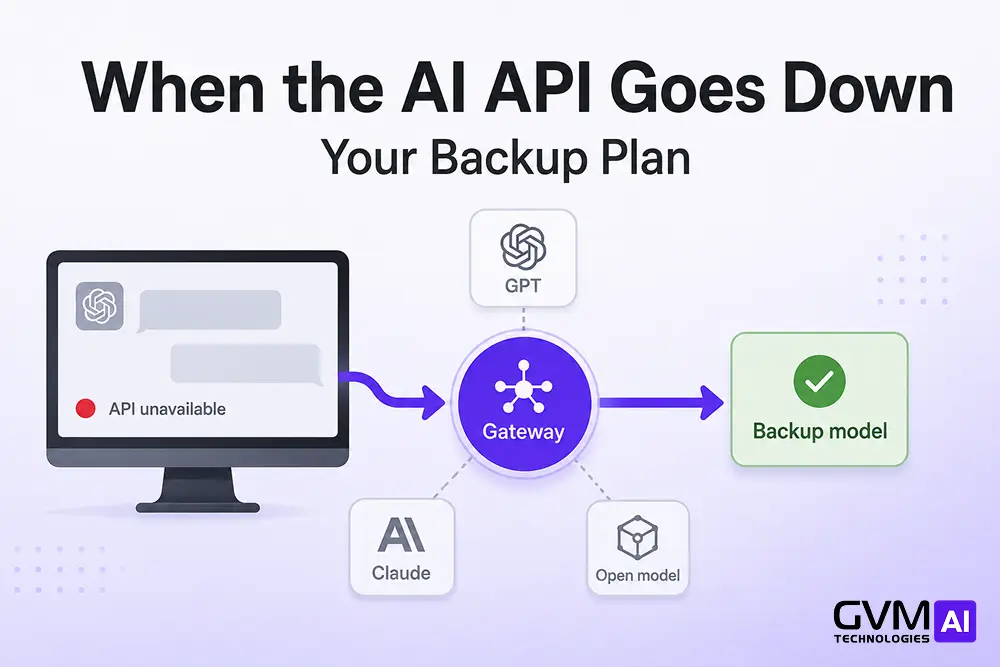
When the ChatGPT or Claude API goes down, everything you built on it fails in the same second. Support bots error out, automations stall, and internal tools time out.
Teams running AI agents on GPT, Claude, or Gemini feel it first, because their product depends on a call to another company’s server.
This guide is for the week before that happens. An AI business continuity plan keeps you operating when a provider fails, and the steps below show how to build one.
Quick answer: If the ChatGPT or Claude API goes down, every connected feature fails at once, and customer-facing ones risk revenue within minutes. A working backup plan has four parts: a funded second-provider account, an AI gateway that reroutes traffic automatically, a self-hosted or human fallback for critical workflows, and a rehearsed one-page runbook. Set a recovery target per workflow, then build the fallback to hit it.
Key takeaways
- An API outage breaks your product. A consumer-app outage only slows staff.
- Outages are one of four failure modes. Rate limits, model retirements, and account cutoffs cost more time over a year.
- A second frontier API is not enough. On 20 April 2026, ChatGPT, Claude, and Gemini failed together on shared infrastructure.
- Build in order: dependency map, second provider, gateway failover, self-hosted or human backup, runbook, quarterly drill.
- Keep prompts and context in files you own. Your chat history is not a backup.
A ChatGPT app outage and an API outage are different incidents
“ChatGPT is down” usually means the chat window at chatgpt.com. When your product breaks, the API endpoint failed. They fail separately and hurt different things.
| Signal | Consumer-app outage | API outage |
|---|---|---|
| Who feels it | Staff in the chat window | Your live product and automations |
| Speed | Minutes, work around in another tab | Instant errors for every user |
| Revenue risk | Indirect | Direct if the feature is customer-facing |
| Who fixes it | Employees | Engineering, under pressure |
Check status.openai.com and status.anthropic.com first. The damage lands hardest where the model sits closest to money:
- Checkout, billing, and support automation: revenue lost within minutes.
- Meeting notes and draft copy: a mild annoyance.
Why “switch to another provider” failed on 20 April 2026
The usual plan is “if OpenAI is down, use Anthropic.” On 20 April 2026 that broke: ChatGPT, Claude, and Gemini went dark together.
The top AI APIs run on the same cloud backbone
Providers rent inference from a short list of the same clouds and GPU suppliers. “Use a different model” can mean “use a different model on the same broken hardware.” The AWS US-EAST-1 outage in October 2025 ran about 15 hours and hit 140-plus services.
AI outage frequency is climbing fast
- Q1 2026: 51 high-signal disruption days across ChatGPT, Claude, Gemini, and Copilot, per Ookla’s Downdetector.
- Q1 2025: 6.
- Even 99.5% uptime is about 41 hours a year of downtime.
The rule: a backup only helps if it fails for different reasons than the thing it backs up. Two frontier APIs on shared infrastructure are one point of failure with two logos.
Four ways you lose AI access (an outage is only one)
An outage is the failure everyone plans for. The other three are slower and easier to ignore.
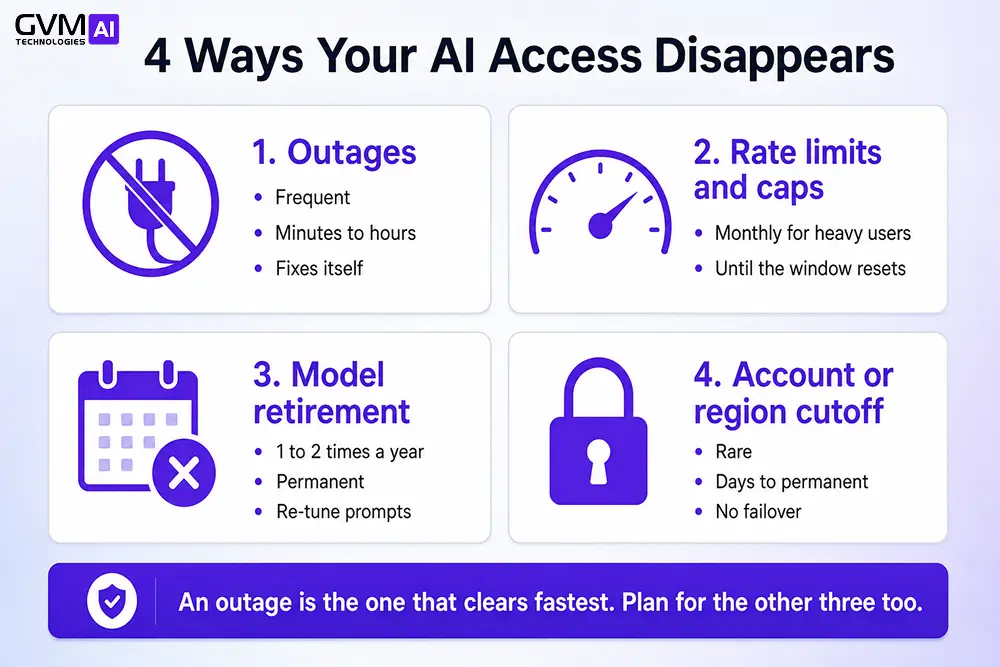
1. Outages hit fast and usually clear within hours
You get 500, 503, 529, and timeouts. Providers post status updates, and most incidents resolve within hours.
2. Rate limits and caps lock you out with no warning
You hit a tokens-per-minute ceiling or a weekly plan cap, and calls return 429. Heavy users report being locked out of the chat window for hours, which stalls any staff work that runs through the app.
3. Model retirement stops your tuned prompts from working
Prompts tuned to one model behave differently on its replacement, and quality drops until you re-test. The GPT-4o retirement forced this on teams that had not planned for it. Assume every model you use is gone in 12 to 24 months.
4. Account and region cutoffs have no failover
An account gets suspended, or a policy change rules out your use case. One organisation of around 60 employees lost Claude access over alleged policy violations and appealed through a web form. Nothing fails over unless you already run on a second provider.
| Failure mode | How often | Duration | Fix |
|---|---|---|---|
| Outage | Several times a quarter | Minutes to hours | Auto failover to another provider |
| Rate limits and caps | Monthly for heavy users | Until the window resets | Higher tier, queuing, a second key |
| Model retirement | 1 to 2 times a year | Permanent | Re-test prompts on the replacement |
| Account or region cutoff | Rare | Days to permanent | A pre-existing second-provider account |
Step 1: Map where AI touches your business
You cannot protect what you have not listed. An AI dependency map takes an afternoon.
List every model call and what it breaks
Ask five questions per AI feature:
- What breaks the second this call fails?
- Does a customer see it, or only staff?
- Is money moving through this path?
- How long can it stay broken before it hurts?
- What is the fallback today, and has it been tested?
The AI agent readiness checklist covers this for teams still planning.
Give each workflow a recovery time target
Your recovery time objective (RTO) is the longest a workflow can be down before it costs you.
- Customer-facing and revenue-linked: RTO in minutes.
- Internal and operational: RTO in hours.
- Experimental: RTO in days.
Scenario: A 40-person software firm ran onboarding emails, its help bot, and churn scoring on one Claude key. A two-hour outage broke all three at once, and the product looked dead. A dependency map would have flagged the shared key.
GVM Technologies AI starts every AI automation project with this map, because it usually finds two or three single points of failure the team had stopped noticing.
Step 2: Add a backup that fails for different reasons
A second option only helps if it stays up when the first goes down. Four choices, least to most independent.
1. A funded second-provider account
Keep paid, tested integrations with two of OpenAI, Anthropic, and Google. This covers single-provider outages, suspensions, and rate limits, but not shared-infrastructure failures like April 2026.
2. An AI gateway that reroutes automatically
Your app calls a gateway. On an error, a 429, or high latency, it retries against a backup model with no code change. Options include LiteLLM, Cloudflare AI Gateway, AWS Bedrock, and Google Vertex.
Watch for failover that drops conversation history. A chat assistant needs the gateway to carry state across the switch.
3. A self-hosted open model for critical paths
An open-weight model such as Llama, Qwen, or Mistral, on infrastructure you control. This is the only backup no one else can revoke.
It trails the frontier by about six months, which is invisible for classification, extraction, and routing. See on-premise versus cloud AI.
4. A human process behind every customer-facing task
Once AI removes people from a workflow, the memory of doing it by hand fades within a year. Keep the manual path written down.
| Workflow type | Fallback | Why |
|---|---|---|
| Transactional (checkout) | Gateway plus human review | Sub-minute recovery plus a safety net |
| Conversational (support bot) | Gateway with state plus human queue | Users must not lose the thread |
| Internal high-volume (tagging) | Self-hosted open model | Within open-model range, fully independent |
| Judgment-heavy (research) | Second provider, accept a dip | The work can wait an hour |
Warning: check what your backup runs on. GPT on Azure with Claude on AWS is real independence. Both in the same cloud region is one backup, not two.
Step 3: Keep prompts, context, and data portable
Switching is not free. Prompts are model-specific, and your context often lives inside one vendor’s account. Operators who switched platforms fastest in 2026 kept that material in files they controlled.
1. Write model-neutral instruction files
Keep system prompts as plain, generic guidance in ordinary Markdown. One team moved its whole operation to a rival platform in a morning, because the switch was a find-and-replace, not a rebuild.
2. Store working knowledge in a system you own
Project rules, brand voice, and reference material belong in your repository or database. The chat window is where you think, not where you store. This is the discipline behind good AI agent memory and context design.
3. Export chat history and check retention terms
Providers keep consumer chat data briefly after deletion and API logs for less. Zero-retention terms are usually enterprise-only. If an account is closed or a model retired, the transcript may be gone.
Note: treat chat history like a draft in someone else’s document. Useful, deletable, not a backup. Move anything that matters out as you go.
Step 4: Write the runbook and run a 72-hour drill
A plan nobody has read on a bad morning is not a plan.
1. Give every team a one-page outage runbook
It answers: how do we know AI is down, which backup do we switch to, who does it, what do we tell customers, when is it resolved. The AI change management checklist is a good base.
2. Pre-write the status messages
- Internal: “The [provider] API is degraded. Feature X is on backup and slower. Feature Y is manual, see the runbook.”
- Customer: “Our AI assistant is briefly unavailable. Our team is handling requests directly.”
3. Run a quarterly “all AI is gone” test
Ask whether you could operate for three days with every frontier API down. Each “no” is your next priority.
Continuity checklist:
Dependency map under six months old
Written RTO for every customer-facing workflow
Second provider funded and tested, not just registered
Gateway handles retries and failover
Multi-turn features keep state across a switch
Self-hosted or human fallback for critical paths
Prompts and context in files you control
Chat history exported on a schedule
Runbook per team, reviewed this quarter
Status-page and self-health alerts live
Where your business sits: the AI continuity ladder
Most teams are on rung 0 or 1 and think they are on rung 3. A drafting tool can stay at Level 1, but a payment flow needs Level 3 or 4.
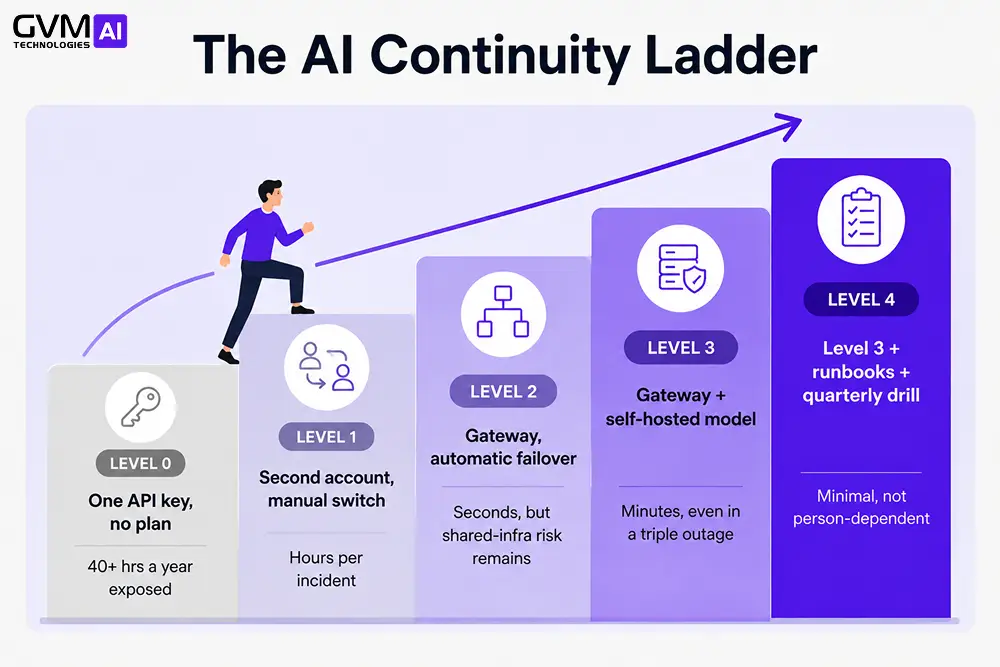
| Level | Setup | Downtime exposure |
|---|---|---|
| 0 | One API key, no plan | Every outage in full, 40-plus hours a year |
| 1 | Second account, manual key switch | Hours per incident |
| 2 | Gateway with automatic failover | Seconds, but shared-infra risk remains |
| 3 | Gateway plus a self-hosted model | Minutes, even in a triple outage |
| 4 | Level 3 plus runbooks and a quarterly drill | Minimal, not person-dependent |
Mistakes that turn a short outage into a lost day
- Confusing the app with the API. Engineering checks its own code for 20 minutes before spotting a provider outage.
- Calling Gemini a ChatGPT backup without checking the cloud. Same region, same failure.
- A backup that has never run. Tested once, now broken on an API version change.
- Secrets pasted into prompts. A rushed switch is a bad time to find sensitive data in prompt text. Set rules early with controlled AI agent access to customer data.
- Planning only for outages. Caps, retirements, and bans cost more time over a year.
What an AI business continuity plan costs
| Component | Setup | Ongoing |
|---|---|---|
| Second provider account | Free | Pay per call, near zero idle |
| AI gateway, open source | Free | Hosting only |
| AI gateway, managed | Low | Per-request fee |
| Self-hosted open model | GPU setup | GPU or hosting fee |
| Runbooks and drills | Free | A few hours a quarter |
The real cost is engineering time, not infrastructure. A Zapier survey via the Forbes Technology Council found 74% of enterprises would disrupt operations if they lost their main AI vendor, and 89% would need a month to switch.
How GVM Technologies AI keeps your AI running
We build continuity into the first design, not after the first outage:
- Dependency audit. Every model call, its blast radius, its recovery target.
- Abstraction layer. A gateway so models become swappable parts.
- Tiered fallbacks. Second provider, self-hosted model, or a human path per workflow.
- Runbooks and drills. Documented, comms pre-written, rehearsed.
This applies to support agents, document pipelines, and AI in healthcare or finance where downtime carries regulatory weight.
Book a free AI resilience audit. We map your dependencies, find the single points of failure, and hand you a continuity plan scoped to your systems. Talk to an expert at GVM Technologies AI. No cost, no obligation.
FAQs
1. How often does the ChatGPT API go down?
Several disruptions a quarter. Q1 2026 saw 51 high-signal disruption days across the four major AI platforms, so plan for 40-plus hours a year per provider.
2. Can I switch to Gemini if OpenAI is down?
Sometimes. The 20 April 2026 outage took all three down together on shared infrastructure, so a second frontier API only covers provider-specific incidents.
3. Do open-source models work as a fallback?
Yes for most production tasks. They trail the frontier by about six months, which shows only on your hardest reasoning work.
4. How do I tell if the app or the API is down?
status.openai.com and status.anthropic.com report them separately. Your product breaking means the API. Only staff affected means the app.
5. What is an AI gateway?
A service between your app and the providers. It picks a provider, retries on failure, and reroutes to a backup model with no code change.
6. What happens to my data if a provider closes my account?
It may be unrecoverable. Export history on a schedule and keep prompts and context in a repository you control.
Conclusion: resilience is designed, not improvised
AI outages are routine now. Teams that keep working through them decided in advance where the model could fail and rehearsed the switch.
Start with the dependency map. It is free, it takes an afternoon, and it almost always finds a single point of failure you did not know was there.
If you would rather not do it alone, book a free AI resilience audit with GVM Technologies AI and we will show you where an outage would hit.