
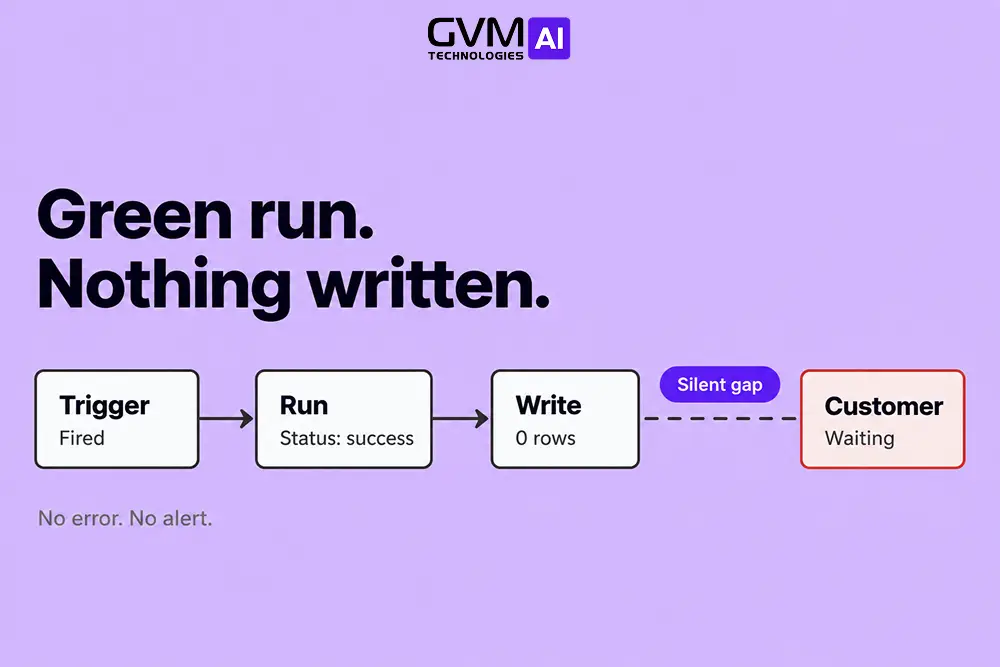
You should switch from Zapier or Make to custom code when failures cost more than the platform saves. The signs are silent failures, repairs that outlast the task, and logic the canvas cannot hold.
Most breaks are fixable, and AI agent vs no-code automation covers where the tools differ. This guide shows which breaks to patch, which are structural, and when to switch from Zapier.
Quick answer: Patch the break when the cause is config, such as an expired login, and every failure alerts you. Switch from Zapier to custom code for any workflow that scores 4 of 6 on the Break-Point Test below. Leave the rest as no-code automation.
Key takeaways
- No-code automation alerts on errors, not on absence, so silent failures often reach customers first.
- Publishing a Zapier error handler turns off autoreplay and error emails, which can create a new blind spot.
- A sudden drop in task use can signal a dead trigger, because failed and filtered steps cost 0 tasks.
- Score each no-code automation on 6 signals, and rebuild only the ones that score 4 or more.
- Cost alone rarely justifies a switch from Zapier to custom code. A single lost customer or invoice usually does.
What no-code automation breaking really means
No-code automation keeps breaking when fixed building blocks meet changing apps, messy data, and unchecked AI output.
Most breaks are config problems you can fix in minutes. The rest are structural: the workflow needs retries, memory, validation, or monitoring that the canvas cannot express.
The 4 failure types no-code platforms produce
| Failure type | What happens | Does the platform alert you? |
|---|---|---|
| Loud | A step errors and the run shows as failed | Usually |
| Halted by design | A filter or search finds nothing, so the run stops | No. Zapier calls it “safely halted” and keeps the Zap on |
| Absent | The trigger stops firing, so no run exists | No. Nothing exists to report |
| Wrong but green | The run succeeds but writes a blank, 0 rows, or an invented value | No. The run looks healthy |
Only loud failures reliably alert. The other 3 are how silent failures reach customers first.
The who-notices test
Ask 1 question per workflow: if this stops tonight, who notices, and how late? “Me, tomorrow” means a platform fix is enough. “A customer, weeks later” means monitoring or custom code.
A common pattern: a handoff between 2 systems quietly stops, and a customer asks where an order is. Why AI agents fail in production shows the same pattern.
Why Zapier and Make automations break
Automations break because the systems around them change without notice.
Apps rename fields, logins expire, blank cells reach formatters, AI steps return a new shape, and platforms halt runs at built-in limits. Each cause leaves a different trail in run history.
1. App changes, expired logins, and blank data
APIs (the interfaces apps use to talk to each other) change, and OAuth tokens (saved login permissions) expire. A renamed field turns a mapped value blank, and the run can still show success.
A blank date cell is the classic trap. A formatter that receives nothing can return 12/31/1969, which is Unix timestamp 0 in US time zones.
Fix both with a “field exists” filter before every formatter, and test blank rows on purpose. Most no-code automation breaks start here.
2. AI steps that drift or invent
AI steps add 3 failure paths:
- Renamed outputs. AI app steps can change output field names between versions, so a mapped field goes empty.
- Retired models. OpenAI’s deprecations page lists shutdown dates, and generally available models get at least 6 months’ notice.
- Confident wrong answers. A model can return a believable false value that passes every filter.
GVM Technologies AI adds a validation gate that forces a handoff instead of a guess. See AI agent hallucinations in production.
3. Platform limits that stop or repeat runs
- Zapier turns a Zap off when 95% of its runs in 7 days error, per its error troubleshooting guide.
- Make deactivates a scenario after a set number of consecutive errors, which you control in scenario settings.
- Zapier guarantees at most 60 days of run history and shows up to 10,000 runs, per its Zap history docs.
That makes the platform a short-term log, not an audit trail.
Why no-code automation hides silent failures, and how to catch them
Platforms alert on errors, not on absence, which is why silent failures persist. A dead trigger creates no run, and a green run that writes 0 rows looks healthy.
Catching silent failures takes checks that compare outcomes against the source, not run status.
3 traps that hide silent failures
- The filter trap. A renamed field can make a filter match nothing. Zapier then logs a “safely halted” run, which looks like success.
- The error-handler trap. Zapier’s custom error handling guide says publishing a handler disables autoreplay and that error notification emails are not sent. If the handler’s alert step breaks, nothing tells you.
- The task-meter dip. Failed and filtered steps cost 0 tasks, per Zapier’s pricing page. A drop in task use on a steady-volume workflow can mean a dead trigger.
AI steps add a fourth trap. A model update can change output shape overnight with no error, as in an agent that stopped working after a model update.
A 5-check monitoring stack for this week
- Error alerts. Post failed runs to Slack or email with the record ID.
- Heartbeat. End each run with a ping to a dead-man’s-switch service. Alert when pings stop for twice the usual interval.
- Daily reconciliation. Compare records created at the source with records written at the destination.
- Escalation. If nobody acknowledges an alert in 30 minutes, page the backup owner.
- Run log. Write timestamp, record ID, and outcome to 1 table you control.
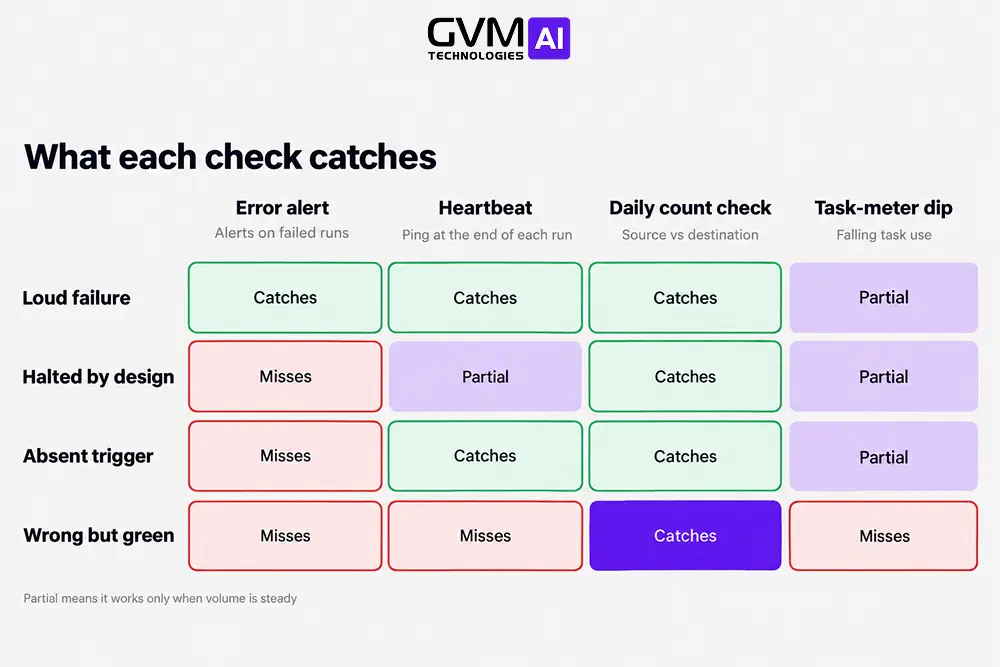
If these checks end the surprises, stay put. If silent failures keep coming, it is time to weigh a switch from Zapier.
When to switch from Zapier or Make to custom code
Switch when fixable no-code automation breaks turn structural: you cannot see failures, repairs outlast the task, or 1 miss is expensive.
Score each workflow on 6 signals. At 4 or more, rebuild that workflow in code and switch from Zapier for that one only.
1. The Break-Point Test: 6 signals before you switch from Zapier
| # | Signal | Threshold |
|---|---|---|
| 1 | Silent failures | A failure went unnoticed for over 1 day in the last 90 days |
| 2 | Slow repairs | Fixing the last 3 breaks took longer than doing the task by hand |
| 3 | Workaround pile-up | A Zap exists only to repair another, the workflow has 10+ steps or 5+ branches, or nobody can explain it in 1 sentence |
| 4 | Blast radius | A miss touches money, customers, or regulated data |
| 5 | Unchecked AI step | AI output reaches customers or systems with no validation or memory |
| 6 | Cost crossover | Payback on a rebuild is under 18 months |
Read the score this way:
- 0 to 1: Stay and add monitoring.
- 2 to 3: Harden the workflow or build a hybrid.
- 4 to 6: Rebuild that workflow in code.
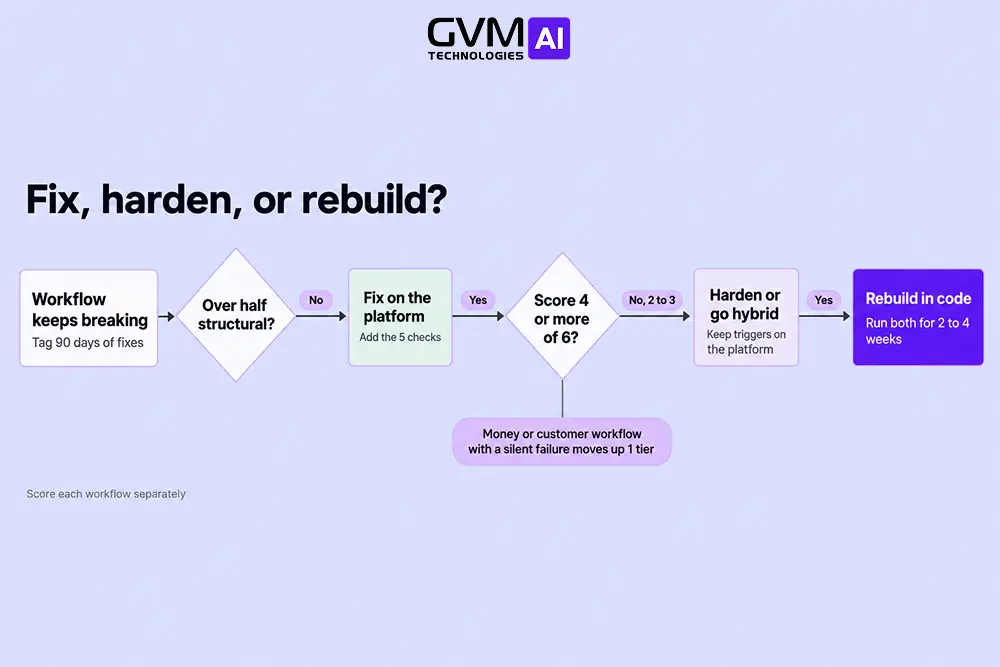
Any money or customer workflow with a silent failure moves up 1 tier.
Signals 4 and 5 need extra care: see giving an AI agent access to customer data and an AI agent readiness checklist.
2. The breakage ledger: config or structural?
List 90 days of fixes and tag each cause. Config causes, such as a token, a mapping, or a blank cell, are fixable on the platform. Structural causes, such as missing retries, memory, or an audit trail, are not.
As a rule of thumb, switch from Zapier for a workflow when over half its breaks are structural. When most are config, fix them and add monitoring.
3. Cost math before you switch from Zapier
Zapier’s published Team plan lists 5,000 tasks per month at $178.50 with monthly billing, or $119 annually. Only successful action steps count, so a 4-action Zap running 1,000 times uses 4,000 tasks.
Payback in months equals build cost divided by (platform bill minus custom running cost). A hypothetical $12,000 build costing $150 a month to host and maintain saves $28.50 a month, so payback takes about 421 months.
Agency guides often cite a $200 monthly bill or 50,000 tasks. Treat those as hints. If 1 silent failure costs more than a year of platform fees, reliability is the reason to switch.
What to try before you switch from Zapier to full custom code
You have 5 rungs between a broken Zap and a full rebuild, and the cheapest rung that removes the failure wins.
Skipping rungs often recreates what the platform already gave you. Each rung fixes a different problem and carries its own limit.
The 5-rung ladder
| Rung | Fixes | Limit |
|---|---|---|
| 1. Add monitoring | Silent failures | Does not fix logic |
| 2. Simplify or split | 10+ step Zaps | Platform limits remain |
| 3. Move to Make or n8n | Cost and branching | You own scenario design or hosting |
| 4. Hybrid build | State, validation, AI checks | You now run a small service |
| 5. Full custom | Audit, scale, ownership | You rebuild retries, logging, and auth |
Why a hybrid usually comes first
Most teams that switch from Zapier start here, with a hybrid. Keep triggers and simple actions where connectors exist, and put the highest-risk workflow behind a webhook to a service you control.
Teams that go fully custom without scoping often rebuild the retries, run history, and approvals the platform already had.
GVM builds custom middleware for this layer through its AI business automation services.
Keep form-to-sheet copies, low-volume alerts, and one-way notifications in no-code automation.
How to switch from Zapier without breaking production
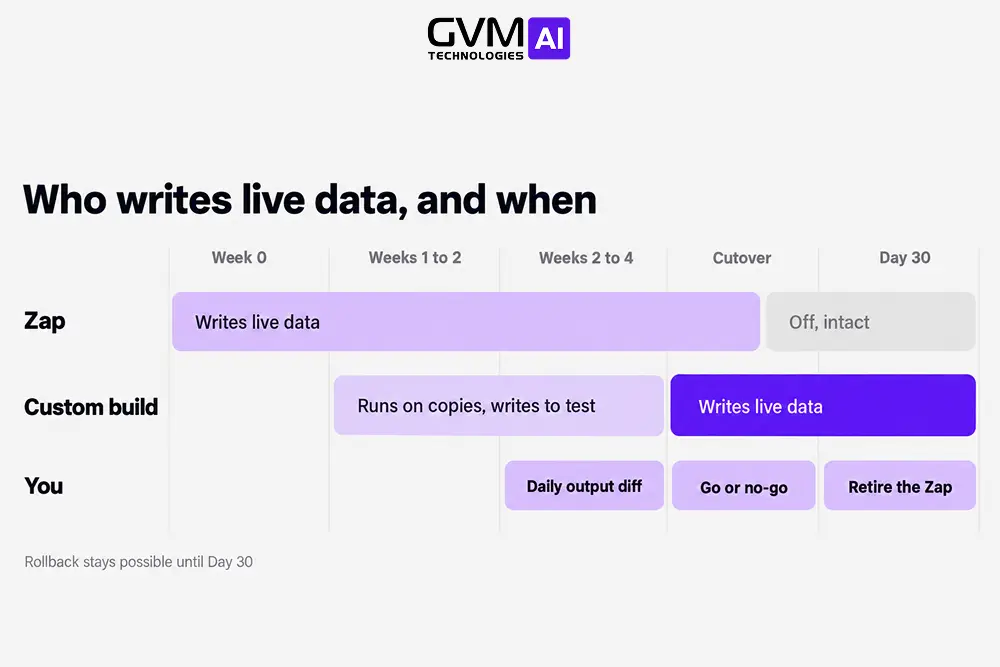
Run old and new side by side, scope 1 workflow first, and cut over per workflow. A parallel run of 2 to 4 weeks is common practice.
Treat the existing Zap as the spec and its run history as test data.
A 6-step migration plan
- Pick the highest scorer on the Break-Point Test.
- Pull 10 real edge cases from run history: blank rows, duplicates, renamed files.
- Build with idempotency, meaning a unique key per record so a retry never repeats an action.
- Run both versions in parallel for 2 to 4 weeks and compare outputs daily.
- Cut over, and keep the Zap switched off but intact for 30 days.
- Hand over a runbook and name a backup owner.
A phased AI rollout applies the same small-steps logic.
What day-1 custom code must include
- Retries with limits and backoff
- Duplicate protection on every write
- A run log searchable by record
- Alerts for absence and for count mismatches
- Token refresh and secret storage
- A human fallback for low-confidence AI output
After you switch from Zapier, the pieces the platform bundled become your job. The trigger and action took an hour; the rest is the real work.
GVM’s automated email CRM case study reports reply rates up over 40% and up to 70% less manual follow-up.
Who owns it after you switch from Zapier
When you switch from Zapier to custom code, ownership moves to you.
AI coding tools can cut build cost, but hosting and alerts still need an owner, so compare agency versus in-house ownership.
FAQs
1. Why does my Zapier automation keep breaking?
Usual causes are expired logins, renamed fields, blank data, rate limits, and changed AI output. Find the first failed step in run history, then reconnect and remap.
2. How do I know when to switch from Zapier to custom code?
Score the workflow on the 6 signals. A score of 4 or more, or any silent failure on a money or customer workflow, means switch from Zapier for that workflow.
3. Is custom code cheaper than Zapier or Make?
Only at high volume or after a costly failure. Divide build cost by monthly savings before you switch from Zapier.
4. Can I stop silent failures in no-code automation before I switch from Zapier?
Often yes. Error alerts, a heartbeat, a daily count check, and a named owner catch most of them in a few hours.
5. Should I try n8n before I switch from Zapier to custom code?
n8n or Make with error routes is a fair middle step. You then own hosting or scenario design.
Conclusion: switch from Zapier only where the score says so
Most no-code automation breaks are config, so patch them and move on. A few workflows fail for structural reasons, and silent failures there cost a lead, an invoice, or a customer’s trust.
Those are the workflows worth rebuilding in custom code, in-house or with an AI automation agency.
Your first 30 days:
- Week 1: Add error alerts, a heartbeat, and a daily count check to every no-code automation touching money or customers.
- Week 2: Tag 90 days of breaks as config or structural, then score each workflow.
- Weeks 3 to 4: Build the top scorer behind a webhook and run it beside the Zap.
- After week 4: Cut over, and keep the Zap off but intact for 30 days.
AI steps keep making silent failures harder to spot, because wrong output looks like success. Build the checks before the next model update forces the issue.
Not sure whether to switch from Zapier? Get your workflows scored free
Each week a broken workflow stays live, it can drop leads, invoices, or messages without a sound. GVM Technologies AI will score yours against the 6 signals and say plainly whether to patch or rebuild.
If monitoring alone fixes it, the review says so. Your free review covers:
- A scored list of your workflows against the 6 signals
- A map of where failures can go unnoticed
- Validation and human-handoff points for each AI step
- A phased plan to move 1 workflow to custom code