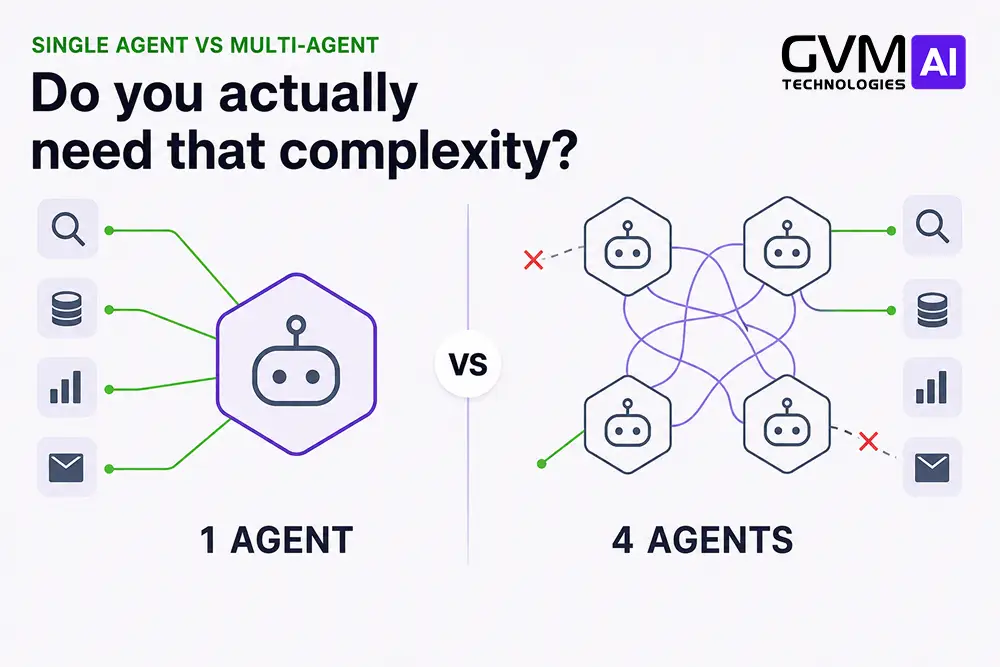
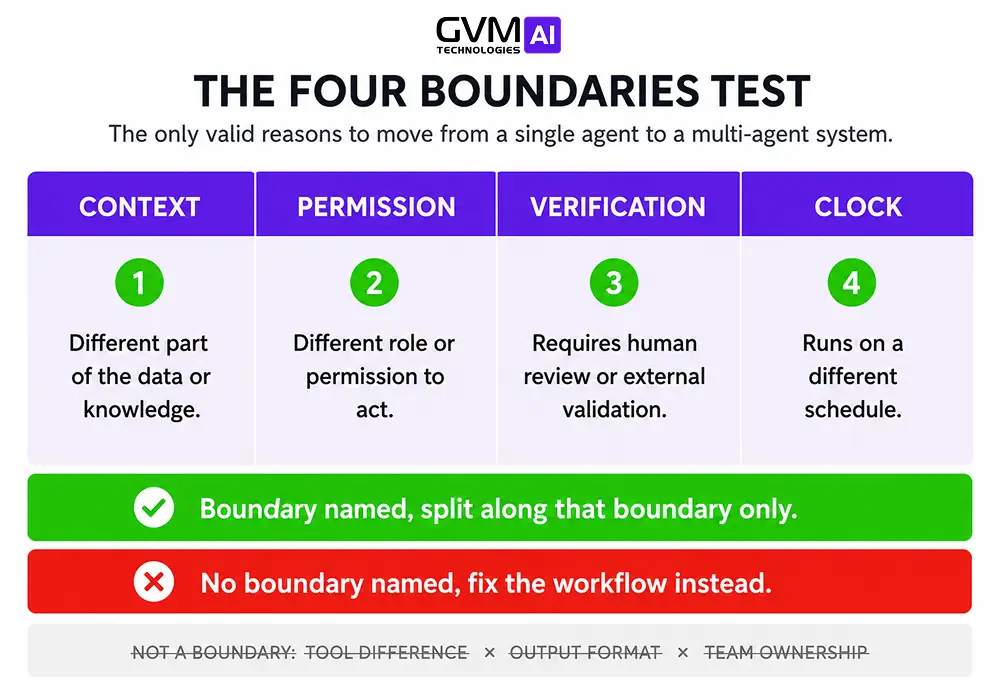
Quick answer: In single agent vs multi-agent systems, default to one agent. Add a second only when you can name the boundary it crosses:
- Context: the work truly will not fit one window
- Permission: two jobs must not share credentials or audit trails
- Verification: the checker must be blind to how the answer was built
- Clock: tasks genuinely run at the same time
Name none of these and you have a workflow problem, not an architecture problem. Google’s study of 180 setups found multi-agent lifts results up to 80.9% on work that splits cleanly and drops them 39% to 70% on work that runs in order. Not sure you need an agent at all? Start with AI agent vs no-code automation.
Two of the most respected teams in AI published opposite conclusions in the same month.
Anthropic shipped a multi-agent research system that beat a single agent by 90.2%. Cognition, the team behind Devin, published “Don’t Build Multi-Agents.” Both were right. Search splits cleanly. Coding does not.
Key Takeaways
- One agent with good tools covers most business workflows. Microsoft tells teams to test one agent first unless compliance forces a split.
- “One agent with 20 tools” is not multi-agent. Many systems sold as multi-agent are one orchestrator plus a fan-out tool.
- Multi-agent wins on work that splits, loses on work that runs in order.
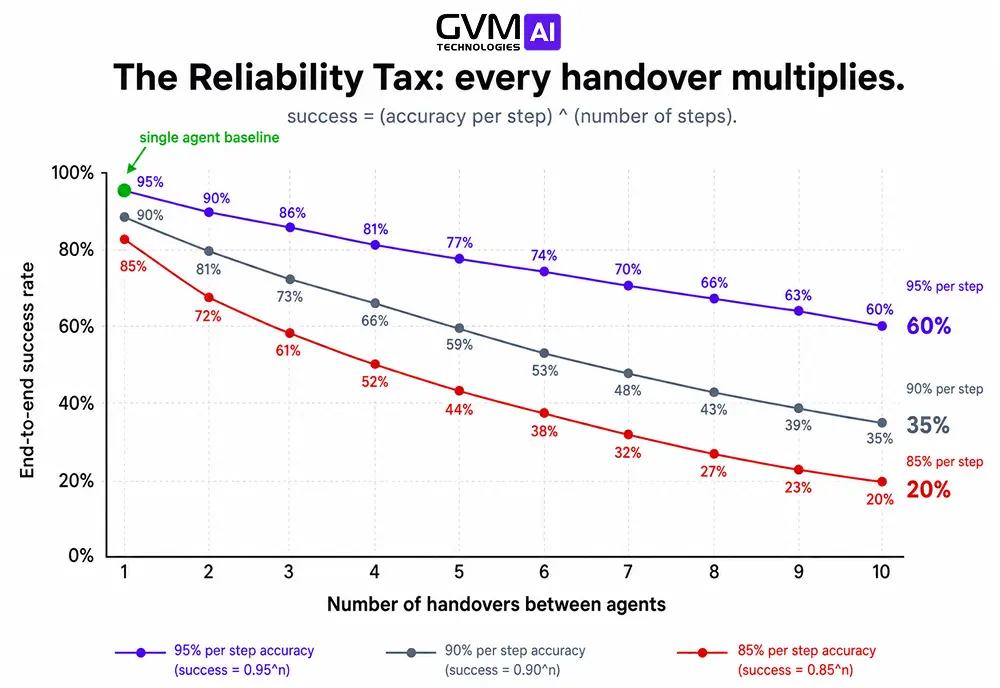
- Errors multiply. Five handovers at 95% each land you at 77%. Ten at 85% land you at 20%.
- The dangerous failure is silence, not a crash. Two agents writing one record produce output that reads perfectly and is wrong.
- Budget 15x tokens. Anthropic’s own figure, not a worst case.
The Definitions That Actually Matter
1. Single-agent systems
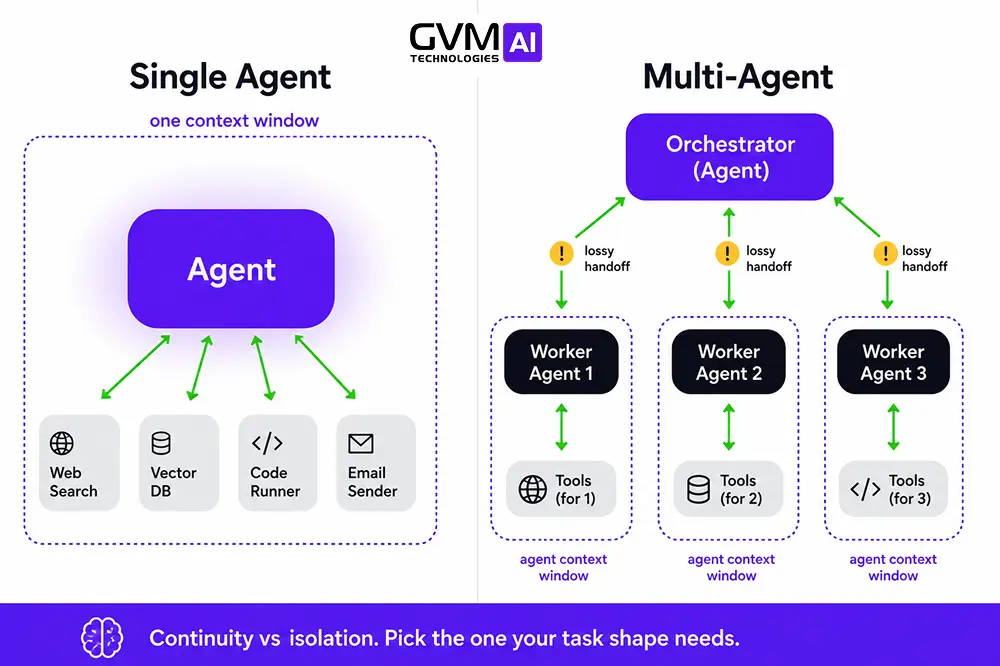
One model, one context window, one loop, with tools attached. What matters is continuity.
The agent reads a ticket, queries the CRM, then checks a billing record, and all three results stay in the same memory. Step 3 can react to something odd it found in step 2.
2. Multi-agent systems
Two or more agents with separate context windows passing work between them. What matters is isolation.
Agent B never sees how Agent A got there, only what A handed over. Useful when you want a reviewer who cannot inherit the writer’s blind spots. Costly when B needed a detail A left out.
3. Side by side
| Dimension | Single-agent | Multi-agent |
|---|---|---|
| Context | One shared window | Separate windows, lossy handovers |
| Best task shape | Step by step | Splits cleanly into parts |
| Token cost | Baseline | ~15x on research work |
| Debugging | One transcript | Trace across several logs |
| Failure signature | Loud, in one place | Quiet, at the joins |
| Access | Every tool, one agent | Least access per agent |
| Ops burden | One config | Several configs, drifting |
One-line rule: if the next step depends on what the last step found, keep it in one head.
The Costume Check
A team builds an orchestrator that calls a search function, a scoring function, and a CRM write function, then calls it a three-agent system.
It is one agent with three tools and a nice diagram.
A fintech team auditing their own stack found half of what they had labelled multi-agent was one orchestrator with a fan-out tool. Collapsing it back made the system faster and easier to trace.
Three questions settle it:
- Does each part have its own context window the others cannot read?
- Does each use different tools or different logins?
- Could one reject another’s output without restarting the run?
Three noes means you have a single agent, and you are budgeting for orchestration you never use, which AI agency vs in-house AI team covers.
What the Research Actually Says
The Google Research, DeepMind, and MIT study Towards a Science of Scaling Agent Systems evaluated 180 configurations:
- Tasks that split cleanly: multi-agent up to +80.9%
- Tasks that run in order: multi-agent -39% to -70%
1. The 45% ceiling nobody mentions
The same study found that once a single agent already scores above roughly 45% on a task, adding agents stops helping and often hurts.
Multi-agent rescues work one agent does badly. It does not improve work one agent already does well.
2. Why both camps had a point
Anthropic’s multi-agent research system works because search splits cleanly. Each subagent gets its own brief, its own window, and no knowledge the others exist, so nothing collides.
Coding is the opposite. Step 4 depends on a decision made in step 2, so splitting it throws away what the task needed.
3. Errors multiply, they do not add
95% per step looks excellent on a dashboard. Ten in a row and two of every five runs fail.
The Four Boundaries Test
You may add a second agent only if you can name the boundary it crosses. Everything else is a workflow problem in disguise.
1. Context
- Split when the work truly will not fit one window, after trimming what you feed it
- Do not split when the window is just full of junk
The 10-minute check: print the raw tool outputs from one real run. If more than a third is irrelevant, fix what you feed the agent, not the architecture.
A million-token window does not solve this either. Dumping everything into one giant call gives the model all the data and it still misses the links between pieces, because the thinking happens between tool calls, not after the data arrives.
2. Permission
Split when two jobs must not share logins, data access, or audit trails. Microsoft’s Cloud Adoption Framework puts this first.
One agent holding both a credit-decisioning tool and a marketing tool leaves a log proving it could reach both. Auditors treat that as a failure whether or not it combined them.
Watch the side door. Separate logins stop direct access, but not Agent A summarising restricted data into a note Agent B reads freely, which AI agent access to customer data covers.
3. Verification
Split when you need a check that cannot be swayed by the thinking that produced the answer.
Two agents sharing the same context do not check each other. They agree faster.
You can get this without a real multi-agent system. Run the check in a fresh session that sees only the output and the pass criteria, never the working. Two rules keep it honest:
- No write access, or it stops being a check
- Explicit pass or fail criteria, never “share your thoughts”
Most “critic agent” setups fail the first rule.
4. Clock
Split when tasks truly run at the same time and none waits on another. This is where the +80.9% lives.
Most workflows people call parallel just run in order with fast handovers. If Agent B’s instructions contain anything Agent A found, you paid for orchestration you did not get.
5. What is not a boundary
- “The roles are different.” One agent can be planner, writer, and reviewer with different instructions per stage.
- “The workflow is complex.” Complex and separable are not the same thing.
- “We might scale later.” Only counts if three to five separate functions will be owned by separate teams.
Five Cheaper Fixes to Try First
- Restructure the prompt. A short standing instruction, plus task context added per run.
- Fix the tools. Accuracy slips around 10 to 15 tools, so merge, rename, delete.
- Stage the tools. Each workflow step exposes only the four or five tools it needs.
- Fix what you feed it. Better search and ranking beats more agents, every time.
- Add a blind check. Fresh session, output plus criteria only, no write access.
Step 3 does the most work and gets the least attention. A lead-qualification agent sees only the data APIs while enriching, only the scoring functions while scoring, and only the CRM while routing.
Same agent, same context, never fifteen tools at once. For data-heavy work, AI-driven data analytics matters more than any framework.
The Five Costs of a Second Agent
| Cost | What happens | Magnitude |
|---|---|---|
| Tokens | Every agent re-reads context, orchestrator pays on top | ~15x on research work |
| Speed | Each handover is another round trip | 2x to 3x slower |
| Reliability | Errors multiply, detail is lost at every handover | 95% x 5 steps = 77% |
| Engineering | One transcript becomes several logs | 10-minute fix becomes a 2-hour hunt |
| Monitoring | Knowing which agent is stuck or burning money | Grows with every agent |
Studies of multi-agent failures put roughly 42% down to unclear instructions, 37% to coordination breakdowns, and 21% to missing checks. Most bugs sit at the joins, and most monitoring tools do not watch the joins.
The monitoring row never appears in vendor comparisons. One team running roughly 11,000 agents across 12 countries described what it becomes: more prompts, more configs, steady drift from the documentation.
The Failure Mode Nobody Warns You About
A crash is a good outcome. You see it and fix it in five minutes.
Two agents write to the same record, one keeping a summary and one adding action items. Last write wins, so the summary quietly wipes the action items.
- No error fires
- No alert triggers
- The document reads perfectly
Someone notices two days later, when a follow-up did not go out.
The Single-Writer Rule
- Every agent writes to its own file, and only adds to it. Nobody edits the shared record directly.
- One component updates the shared record. Plain code, not a model.
- Every handover leaves a receipt. What it meant to do, which tools it used, what it skipped.
- Keep coordination in ordinary code. File locking and retries do not need a model’s opinion.
Git worktrees will not save you. They turn a silent overwrite into a visible merge conflict, but git has no idea one agent’s summary ate the other’s action items.
What This Looks Like at Your Size
| Situation | Architecture | Reason |
|---|---|---|
| Founder automating operations | Single agent, staged tools | Debugging cost dominates |
| Agency running client workflows | One agent per client | Isolation is per client, not per role |
| Research, draft, publish | Fan-out research, one agent drafting | Research is parallel, drafting is not |
| Support at moderate volume | Single agent plus human escalation | Each step depends on the last |
| Finance, health, legal | Multi-agent, split on permission | The audit trail requires it |
| Enterprise, 3+ teams | Orchestrator plus domain agents | The split mirrors the org chart |
| Internal tool, mixed seniority | One agent plus a permission layer above it | Access control, not architecture |
The last row is the most common mistake. More agents change nothing if every agent still has the same access, as AI solutions in specialized applications shows.
Three to five workers under one orchestrator is the ceiling. Past that, its ability to route work correctly falls from around 60% to roughly 21% at ten workers.
Four Mistakes That Cost Real Money
- Building for a problem you do not have yet. Easy setup gets confused with being right.
- Splitting by job title instead of responsibility. “Researcher, writer, editor” is an org chart, not an architecture.
- Letting the split exist only in the prompt. It collapses back into one big agent within two releases.
- Measuring only the final output. A problem in step 3 then looks identical to one in step 1.
If You Do Split, Do It in 7 Weeks
- Weeks 1 to 2. Measure the single agent: accuracy, speed, cost per run, how it fails.
- Week 3. Split exactly one boundary, with its own tools, logins, and logs.
- Week 4. Set up single-writer before anything touches the shared record.
- Weeks 5 to 6. Write pass or fail checks on what crosses the handover.
- Week 7. Compare on the same tasks, and roll back if the gap did not close.
Rolling back in week 7 costs a week. In month nine it costs a rewrite, which is why we keep pilots short at GVM Technologies.
Get the Architecture Right Before You Spend the Budget
Most AI projects that fail do not fail on the model. They fail on a decision made in week one that nobody revisited until month nine.
GVM Technologies builds production AI agent systems, and we start with the architecture, not the framework. In a free 30-minute session you get:
- A Four Boundaries verdict on your use case, single or multi, with the reasoning written down
- A realistic cost range for both options, based on your actual volume
- A measurement plan so the next decision is made on numbers
No framework pitch, and no agent count quoted before we understand the work.
Book your free AI architecture consultation and we will stress-test your use case before anyone writes code.
Conclusion
This is not a question about how many agents you run. It is about where you put the coordination.
One agent keeps it inside a single loop, cheap and visible. Several agents spread it across handovers, expensive and hidden until something goes quietly wrong.
So: probably not yet. You will know when that changes, because you will be able to name the boundary in one sentence.
Context. Permission. Verification. Clock.
FAQs
1. Is a multi-agent system always better than a single agent?
No. The shape of the task decides it. Google’s study measured +80.9% on work that splits cleanly and -39% to -70% on work that runs in order.
2. How much more does a multi-agent system cost?
Budget roughly 15x the tokens on research-style work, which is Anthropic’s own figure. Add 30% to 50% on engineering, and expect break-even in months.
3. Can a single agent handle 20 or more tools?
Usually not well, since accuracy drops around 10 to 15 tools. Stage the tools by workflow step before you split into agents.
4. Do I need LangGraph, CrewAI, or AutoGen?
Not to start. A tool-calling loop plus ordinary code covers most systems. Reach for a framework when you need to save and replay runs.
5. Will a 1 million token context window remove the need for multi-agent?
No. A giant dump gives the model the data but it still misses the links, because the thinking happens between tool calls.
6. How do I know if my multi-agent system is failing?
Assume it is failing quietly until proved otherwise. Log what every agent did, check what crosses each handover, and verify work was done rather than that the run finished.