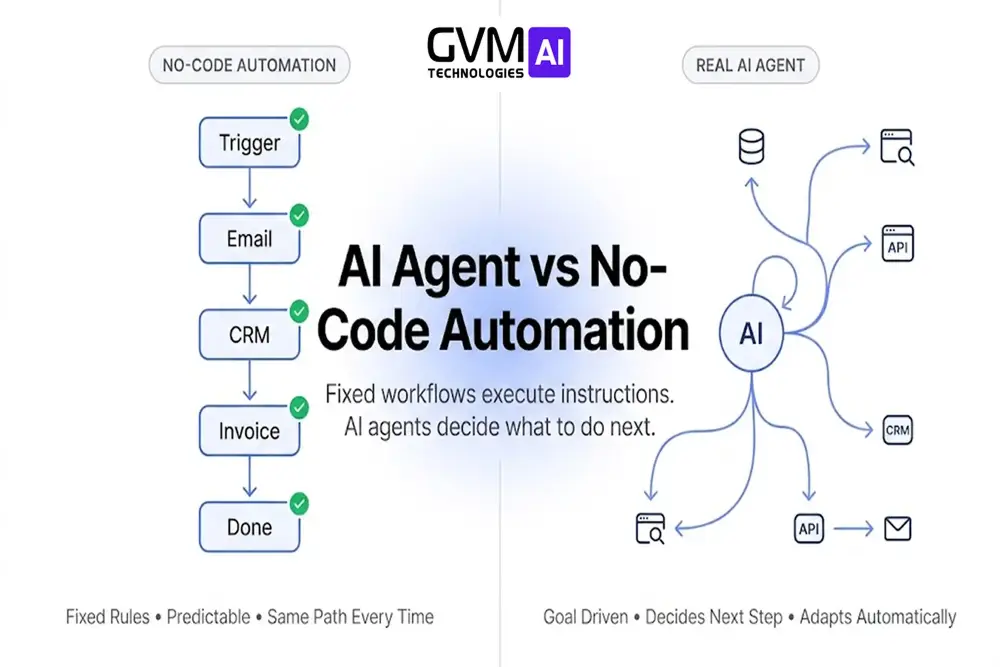
Quick answer: AI agent vs no-code automation comes down to one thing: who decides the next step. A real AI agent decides its own next move and changes course when a step fails, while no-code automation runs a fixed sequence a human designed in advance, even when an AI model fills in one box of that sequence.
Confuse the two and you overpay, or you underbuild. Our AI solutions for business automation team sees both mistakes weekly. This guide stops them before they cost you a quarter.
Key takeaways
- One test settles it in seconds: ask what happens when step three fails. A stalled run means automation. A rerouted retry means an agent.
- No-code platforms typically deliver around 80% of custom-build functionality at a fraction of the cost, per multiple 2026 platform cost analyses.
- Fully custom agent builds commonly run $75,000 to $500,000 and take months, while no-code teams report roughly 40% faster time to market.
- Agent runtime and token cost are non-deterministic. One run can cost 3 times more than the next for the same task.
- The pattern that survives production: the agent decides, a deterministic pipeline validates and executes. Neither piece works alone at scale.
- A poorly guardrailed agent can loop on one broken API call until it burns through its entire context window. Automation cannot fail this way.
What is the difference between an AI agent and no-code automation?
A no-code workflow executes a predefined sequence. The steps, order, and branches are all fixed before the run starts.
An AI agent selects its own sequence at runtime. It is given a goal, not a script.
That sequence can change between runs, even on identical input.
Deterministic vs. non-deterministic execution
Automation is deterministic. Same input always produces the same path and the same cost.
An agent is non-deterministic. Same input can produce a different path, a different runtime, and a different spend.
That predictability is exactly why deterministic automation still runs most of IT infrastructure management today, even inside AI-heavy organizations.
AI agent vs no-code automation: quick comparison table
| Dimension | No-code automation | Custom AI agent |
|---|---|---|
| Execution path | Fixed sequence, set in advance | Decided step by step at runtime |
| Failure behavior | Errors out at the broken step | Retries, reroutes, or swaps tools |
| Role of the AI | One box in a chain someone built | The system choosing the chain |
| Output pattern | Same input, same result | Same input, output can vary |
| Typical build tools | n8n, Make, Zapier, Power Automate | LangGraph, CrewAI, AutoGen, custom tool-calling code |
| Typical build cost | Low, usually subscription plus setup | $75K–$500K for a full enterprise build |
| Debugging model | Fix the broken node | Reconstruct a decision chain, or add a verifier |
The step-three test that settles the argument
Engineers who ship both systems for a living use one question: what happens when step three fails?
- “The whole run errors out.” That is a workflow tool with an AI step attached, a smarter Zapier chain.
- “It reroutes or tries another tool.” That is genuine agentic behavior.
Neither answer is wrong to build toward. The risk is buying one without knowing which you got.
Why teams get burned when they guess wrong
Teams often assume they bought agent-level flexibility from a drag-and-drop tool. They hit a wall around week six.
A customer request does not fit any pre-built branch. The whole run stalls.
They rebuild on a different stack, usually under deadline pressure, at a higher total cost than scoping it right the first time.
This same wall shows up across real deployments. Our full case study library documents where teams hit this exact limit before moving to a governed agent architecture.
What “agentic AI” actually means under the hood
“Agentic AI” gets used loosely. Here is the actual mechanism.
The think-act-observe loop
An agent runs a loop: think, act, observe, repeat.
The model reasons about what to do, calls a tool, and reads the result.
It picks its next move from that result, not from a script. This pattern is called ReAct, and it drives frameworks like LangGraph, CrewAI, and AutoGen.
A chatbot is one LLM call. You ask, it answers, you decide next.
An agent calls tools inside that loop until the task finishes, with no approval needed between steps.
| System type | Decides its own next step? | Typical step count per run |
|---|---|---|
| Chatbot | No, waits for the next human prompt | 1 |
| No-code automation with an AI step | No, follows a fixed path | Fixed, set at build time |
| AI agent | Yes, chooses based on the last result | Variable, often 3 to 12+ |
Where RPA fits versus agents
Robotic process automation (RPA) sits at the rigid end of this spectrum. RPA scripts click and type through one fixed UI path.
An AI agent replaces that fixed path with a model reasoning about what to click, based on what it sees on screen in that moment.
Same category of problem. A fundamentally different mechanism underneath.
Explore how this plays out for specialized business applications, where tasks change shape too often for a scripted RPA flow to hold.
A related confusion: skills, tools, and agents are not the same thing
GVM’s engineering team separates three terms that get flattened into “AI agent” in casual use.
- A tool is one function the model can call: send an email, query a database, fetch a webpage.
- A skill is a packaged capability, usually a bundle of instructions plus one or more tools, invoked as a unit.
- An agent is the orchestrating loop that decides which tools or skills to use, in what order, and when to stop.
A five-node n8n workflow with an OpenAI node is not an agent. It is automation using a language model as one tool.
A system with 30 “sub-agents” that are really just chained prompt templates is not more agentic than one well-built loop. Component count is not autonomy.
Real autonomy versus marketing autonomy
Autonomy is easy to describe and hard to picture. Two examples fix that.
What real autonomy looks like
A coding agent is asked to fix a failing test. It reads the error, forms a hypothesis, and edits a file.
The test still fails. It forms a different hypothesis and tries again, unprompted.
What marketing autonomy looks like
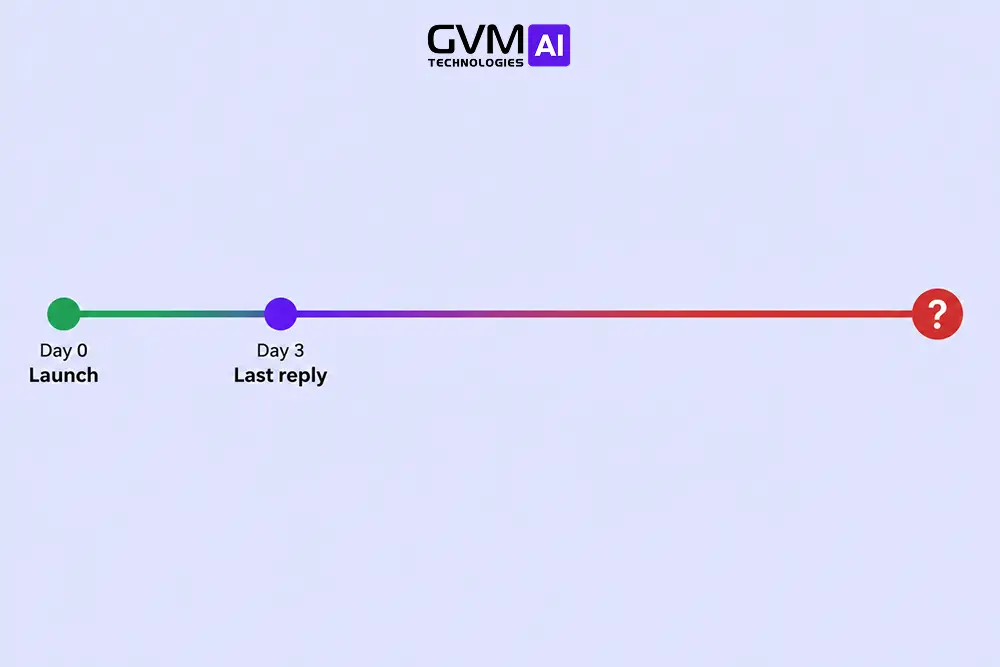
A “sales agent” sends the same email after a lead form is submitted. It waits 3 days, sends a second email, then logs a CRM task on day 7.
Every time, for every lead. That is a solid drip campaign, not autonomy.
Every branch was fixed by whoever built it, not chosen by the model.
The tell in both examples: does the next move depend on something just learned, or was it fixed before the run started?
| Signal | Real autonomy | Branded as “autonomous,” actually fixed |
|---|---|---|
| Next step | Chosen from the last result | Set before the run began |
| On an unexpected result | Adapts its approach | Follows the same branch anyway |
| Path across 10 runs | Can differ each time | Identical every time |
See this play out in a live deployment. Our case study on GVM AI’s customer outreach agent shows the agent’s next action shift based on each prospect’s actual response.
Where no-code automation genuinely wins
No-code tools are not a weaker agent. They solve a different problem well.
- Orchestration glue. Triggers, branching, retries, and fan-out across a dozen SaaS tools is what these platforms were built for.
- Speed to a working version. A functioning automation can reach production proof of concept in an afternoon.
- Predictable cost. Cost per run is knowable in advance, because the path never changes.
- Auditability for non-engineers. An operations lead can open a visual workflow and read it without touching code.
- Lower operating risk. A break happens in one visible, locatable place, not across a chain of AI decisions.
See how a fixed, auditable workflow layer fits inside a broader core AI solution for business before assuming every problem needs full agent autonomy.
Where a custom AI agent genuinely wins
- Variable tasks. Open research, debugging with an unknown fix location, or support triage where the path depends on each ticket.
- Too many branches to draw. A flowchart needing hundreds of boxes is the task telling you it needs live decisions, not a wider diagram.
- Long-running, adaptive processes. Anything that must retry differently on failure, or revise its plan mid-task.
- Deep, non-standard integration. Reasoning over a proprietary schema, or a legacy ERP’s validation rules, usually needs hand-built logic instead of a generic connector.
This is the same shift showing up across how AI is transforming the IT industry more broadly: judgment-heavy work moving from scripted tools to reasoning systems.
Why the two fail so differently
1. Automation failure: the boring kind
A trigger does not fire, an API changes shape, a field mapping breaks.
You get an error, find the node, fix it. The blast radius stays contained.
2. Agent failure: the expensive kind
A model can run for 20 minutes, make dozens of tool calls, and hand back a confidently wrong answer.
Nothing flags it as wrong. Nobody notices unless a human, or a separate check, verifies the output.
One failure signature repeats across GVM’s production monitoring: a 23-minute run, 40 tool calls, a single-digit token bill.
All of it spent producing one wrong answer that sat unnoticed until a manual review caught it.
3. Loop failure: the failure mode automation cannot have
An agent hits a rate limit (HTTP 429) or a malformed reply. It tries to reroute cleanly.
Without a guard, it gets stuck retrying the exact same broken call instead.
# Anti-pattern that causes loop failure: no retry limit, no backoff,
# no exit condition. Do not deploy this.
#
#   while not task_complete:
#       result = call_tool(action)
#       if result["error"]:
#           retry()   # loops forever on a persistent error

import time

def call_tool(action, attempt):
    """Mock tool call. Simulates a rate-limited API for the first 2 attempts."""
    if attempt < 2:
        return {"error": "rate_limited"}
    return {"error": None, "data": "refund_processed"}

def backoff_seconds(attempt):
    return 2 ** attempt

def escalate_to_human(ticket_id):
    print(f"Escalated ticket {ticket_id} to a human reviewer.")

def run_agent_action(action, ticket_id, max_retries=3):
    """GVM's guarded retry pattern: bounded attempts, backoff, human fallback."""
    attempts = 0
    task_complete = False

    while not task_complete and attempts < max_retries:
        result = call_tool(action, attempts)

        if result["error"] == "rate_limited":
            delay = backoff_seconds(attempts)
            print(f"Rate limited. Waiting {delay}s before retry {attempts + 1}.")
            time.sleep(delay)
        elif result["error"]:
            print(f"Tool error on attempt {attempts + 1}: {result['error']}")
        else:
            task_complete = True
            print(f"Action '{action}' completed: {result['data']}")

        attempts += 1

    if not task_complete:
        escalate_to_human(ticket_id)

run_agent_action(action="issue_refund", ticket_id="T-48213")

# Output:
# Rate limited. Waiting 1s before retry 1.
# Rate limited. Waiting 2s before retry 2.
# Action 'issue_refund' completed: refund_processed
A deterministic workflow cannot fail this way. It never retries creatively. It just stops.
This is why build-versus-buy math on agents differs from ordinary software.
Our AI agency versus in-house AI team comparison breaks down who owns this failure once the system goes live.
Three questions that decide the build before you start
- Can you draw the flowchart? Fits one page means automation. Keeps growing means agent-shaped.
- What does a wrong output cost, and who catches it? Human review first means either architecture works. Direct-to-customer output demands a verification layer regardless.
- Does the task actually change shape between instances? Support tickets and open research vary too much to script. Order processing usually does not, even with an LLM involved.
The hybrid pattern that actually survives production
Framing this as a binary choice is exactly why teams overbuild or underbuild.
The decide-then-execute split
The agent decides what should happen and drafts the action. A deterministic pipeline validates that draft against business rules, then executes it.
This gets you the flexibility of a model handling variable input, without ever handing that model unsupervised write access to money or production data.
A concrete example: the refund case
An agent reads an incoming support ticket. It decides the ticket is a billing dispute and drafts a refund.
That draft never touches the payment system directly. It passes through a fixed, auditable pipeline first.
validation_result.json
{
  "agent_decision": {
    "ticket_id": "T-48213",
    "action": "issue_refund",
    "amount": 42.00,
    "reason": "duplicate_charge",
    "confidence": 0.91
  },
  "validation_pipeline_result": {
    "within_policy_limit": true,
    "account_in_good_standing": true,
    "action": "approved",
    "executed_by": "deterministic_workflow",
    "audit_log_id": "AL-993201"
  }
}
Only after that validation does the refund process. Every step logs the same way a pure automation would log it.
Practitioners who build governed, audited AI systems describe this split as the only version of “agentic” a compliance review actually signs off on.
Anywhere a human must explain why the system acted a certain way, this split stops being optional.
Our case study on GVM AI’s automated email and CRM solution walks through exactly this decide-then-execute build in a live account.
Cost and maintenance: the part that gets discovered too late
The real gap between these two approaches rarely shows up in a pilot. It shows up three months in, on a maintenance bill.
No-code maintenance costs
An API changes its schema, a platform ships a breaking update, a trigger stops firing silently.
Someone finds the broken node and fixes it. A self-hosted tool also keeps an escape hatch: drop into a code node without rebuilding the whole system.
Custom agent maintenance costs
Token spend fluctuates with however many steps the model decides a task needs on a given run.
A prompt that worked reliably can quietly degrade after a model version update.
Debugging means reconstructing a decision chain, not pointing at one broken step.
Budgeting for that variance takes real evidence, not a guess. Our work on AI-driven data analytics for IT decision-making covers how to build that evidence before you commit to an architecture.
None of this makes agents a bad investment. It means the cost belongs in the budget as an operating expense with real variance, closer to a utility bill than a fixed subscription.
Teams that get burned rarely chose agents wrongly. They priced an agent-shaped problem using automation-shaped assumptions.
| Cost factor | No-code automation | Custom AI agent |
|---|---|---|
| Cost per run | Fixed, known before you build | Variable, tied to steps taken |
| What breaks it | An external API or trigger change | A model update or ambiguous input |
| Who typically fixes it | Ops or a no-code builder | An engineer who can read model behavior |
| Budget category | Fixed subscription line item | Variable operating expense |
Track this kind of variance before it becomes a surprise. Our full resource library covers budgeting and staffing for AI builds in more depth than one section here can.
Five misconceptions worth clearing up directly
- “No-code tools cannot be agentic at all.” Not true. Several modern platforms support genuine branching and tool-calling loops well beyond a linear chain.
- “If it uses GPT or Claude, it is an AI agent.” An LLM filling one fixed box is generative AI inside a workflow, not an agent.
- “A custom agent is always more powerful than a no-code one.” Power is not the axis that matters. Fit is.
- “Agents are strictly an upgrade, so start there.” Most agentic systems are, correctly, mostly automation with one AI decision point placed where judgment is required.
- “No-code means it is not real engineering.” Several major workflow vendors restrict customer-facing use under their commercial license terms. Read the license before you scale.
Getting this call right is what separates a system that boosts IT service delivery from one that quietly adds support tickets instead of removing them.
A five-step decision framework
- List every distinct path the task can take. One whiteboard means automation. A growing list means agent-shaped.
- Decide what happens on a wrong output. Human review first means either approach works. Direct-to-customer output needs a verification layer regardless.
- Estimate variance tolerance. Can the business absorb a task that costs up to 3 times more on a bad run?
- Check who has to maintain it. Non-technical teams need a visual, inspectable workflow. Engineering teams can justify agent maintenance.
- Prototype the risky 20% first. Build the deterministic 80% as automation, then test the variable slice before rearchitecting everything.
The bottom line: match the tool to the task, not the trend
The AI agent vs no-code automation decision is not about which one is smarter. It is about which one the task actually needs.
Automation wins when the steps are known. Agents win when the steps must be discovered at runtime.
Most real production systems need both. Pick based on what the task requires, not what sounds advanced in a sales deck.
Ready to move past the prototype stage?
An off-the-shelf tool is often the right first move. It is fast, cheap to test, and quickly reveals whether the task needs more.
Teams get stuck at the hybrid layer described above:
- An agent has to reason over a specific CRM’s validation rules.
- It must respect a legacy ERP’s mandatory fields.
- It has to execute through APIs never designed for AI.
- It still has to produce an audit trail compliance will accept.
GVM Technologies AI builds exactly that layer. Our engineers connect custom agents to your real systems through purpose-built middleware instead of generic connector templates.
Every build ships with the guardrails, PII handling, and audit logging that let an agent take real actions without becoming a black box.
If a no-code prototype already showed you where the process needs judgment, talk to our team about custom agent architecture next. Read more on our about page.
FAQs
1. Is n8n an AI agent or just automation?
By default, n8n is deterministic, trigger-based workflow automation. It can host true agentic nodes with retry logic, so one specific build can be agentic even if the platform itself is not.
2. Can a no-code tool ever be a real AI agent?
Yes, if it supports branching where the model’s output decides the next path, plus retry logic for a different approach on failure.
3. Why do AI agents cost more to run than automation?
Token usage scales with however many steps the model decides a task needs, and that number is not fixed. One run might take 3 steps, the next 12.
4. How do I know if my “AI agent” project is actually just automation?
Ask what happens when a step fails. “The workflow stops” means automation. “It tries a different approach” means agentic.
5. Should a small business start with no-code automation or a custom agent?
Start with no-code for fixed, enumerable steps: lead routing, reminders, basic triage. Move to a custom agent only for the slice that breaks the flowchart.
6. What is the biggest mistake companies make choosing between the two?
Picking what sounds impressive over what the task needs. A reliable automation beats a sophisticated agent nobody can trust or budget for.