A chatbot suddenly hallucinating almost always traces to a change you can find: a swapped model, edited files, a new prompt, a longer chat, or new questions.
Sometimes nothing changed and old errors surfaced. A hallucination is a confident answer its sources do not support.
The date the errors began is the best clue. The wider problem is covered in an AI chatbot giving wrong answers.
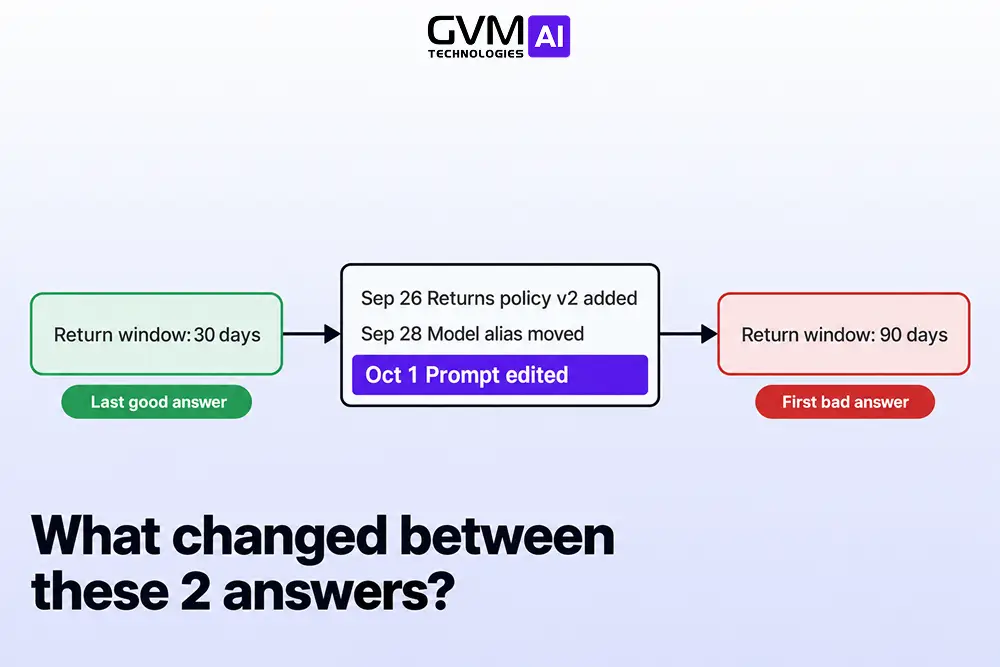
Quick answer: A chatbot suddenly hallucinating means something changed, something crossed a limit, or old errors got noticed. Write down the last good and first bad answer, list every change between them, then undo 1 change at a time.
Key takeaways
- A chatbot suddenly hallucinating is rarely a sudden model failure. 7 places can change without an announcement.
- Providers retire models and move aliases on a published calendar. OpenAI lists shutdowns on Oct 23, 2026.
- A newer model can be worse. OpenAI’s own tests showed o3 hallucinating over twice as often as o1 on 1 benchmark.
- A bot’s explanation of its own failure is generated text, not evidence.
- Long threads, unreadable files, and stale documents can leave an AI chatbot hallucinating with no edit at all.
- A dated change ledger and 20 saved questions usually find the cause in about 30 minutes.
What a Chatbot Suddenly Hallucinating Actually Means
A chatbot suddenly hallucinating is a bot that answered correctly and now states things its sources do not support. “Suddenly” describes when you noticed, not always when it started.
Models predict likely text. Nothing checks a claim against a source unless the system around the model forces that check.
Every sudden case sorts into 1 of 3 types:
| Type | What happened | Typical sign | First move |
|---|---|---|---|
| Changed | An edit, update, or swap | Errors start on 1 date | Undo the newest change |
| Crossed | Slow drift hit a limit | Errors build over weeks, worst in long chats | Trim, refresh, retest |
| Noticed | Errors were always there | Older logs show the same mistakes | Fix grounding, skip the rollback |
What each type looks like in practice:
- Changed: a person or provider altered something. A chatbot suddenly hallucinating from 1 date matches a log entry.
- Crossed: nothing was edited, but a quantity grew. A store bot that reads 9 returns files gets 12 sale PDFs, so retrieval has 21 near-matches to confuse (an illustration).
- Noticed: Vectara’s hallucination leaderboard, updated Sep 22, 2026, puts its best model at 1.8% on summaries and the next at 3.1%.
- Why noticing feels sudden: at 3%, an AI chatbot hallucinating across 1,000 chats a day gives about 30 wrong answers, which is why AI agents fail in production once traffic grows.
Provider Changes That Leave a Chatbot Suddenly Hallucinating
Model providers change models on a published calendar, and an alias can move with no edit on your side.
Dated snapshots stay fixed. Names such as “latest” do not. A provider notice is the first thing to check, so open the dated pages below.
| Source | What can change | Notice given | Dated example |
|---|---|---|---|
| OpenAI | Legacy snapshots shut down | At least 6 months for general models | gpt-4-0613, gpt-4-turbo, o1-2024-12-17 on Oct 23, 2026 |
| Anthropic | Models retired | At least 60 days | claude-sonnet-4-5-20250929 on Nov 30, 2026 |
| Google Gemini | “latest” alias hot-swapped | 2 weeks for breaking changes | gemini-flash-latest |
| Gateways and routers | Fallback to another model when the first is overloaded | Only what you configured | Check the router logs |
Each row is a change you never edited, so a chatbot suddenly hallucinating can follow any of them. The guide on an AI agent that stopped working after a model update covers the repair.
7 Changes That Leave a Chatbot Suddenly Hallucinating
A working chatbot can change in 7 places: the model, real-world facts, the knowledge base, the instructions, the conversation, the questions, and the tools.
A chatbot suddenly hallucinating usually follows the most recent change, so date every suspect. Work through them newest first.
1. The model behind the name changed
- A swapped alias or retired model changes tone, refusals, and how closely the bot follows instructions.
- Newer is not always better. The New York Times reported that OpenAI’s tests found o3 hallucinating on 33% of PersonQA questions, over twice o1’s rate.
- Cost-saving model swaps are a common suspicion and cannot be verified from outside, so test.
Check: the exact model ID, alias versus dated snapshot, and router fallbacks. Finding which model your agent uses shows where the ID lives.
2. The world changed, but the knowledge did not
- A new price, product, or return window leaves the bot answering from the old version.
- A bot without live search has a training cutoff, so it may insist that something recent does not exist.
- Without a current date in the prompt, the bot cannot tell new from old.
- An AI chatbot hallucinating about prices often reads files that never changed.
Check: the last-edited date on the sources behind the 10 most common questions. GVM Technologies AI connects live price and stock systems, so the bot reads the system of record, not last quarter’s export.
3. The knowledge base or index changed
- A new policy PDF beside the old one leaves 2 answers to 1 question.
- Re-indexing can switch the embedding model, the numeric fingerprint that matches questions to passages. Vectors from 2 models are not comparable, so retrieval degrades with no error.
- A scanned or image-only PDF can ingest as empty text, and the bot answers from nothing.
Check: sync logs for the 14 days before the first bad answer, plus the text each new file produced. RAG versus fine-tuning explains how retrieval picks passages.
4. The instructions or settings changed
- The system prompt is the standing instruction read before every chat. Each added rule competes with older ones.
- A new “always be helpful” can beat “say you do not know.”
- Raising temperature (randomness) or the output limit can add filler at the end of answers.
- A chatbot suddenly hallucinating after a prompt edit often traces to a rule conflict.
Check: prompt version history and the settings panel. Teams often patch 1 bad answer with a new rule, and the 15th rule breaks the 3rd.
5. The conversation got long, or got poisoned
- A context window is the text a model can use at once. Chroma’s context rot study tested 18 models and found reliability falls as input grows, even on simple tasks.
- Once a bot invents 1 fact, that fact becomes context, and later answers build on it.
- Automatic summaries of old turns are lossy, so details drift.
- An AI chatbot hallucinating late in a long chat usually points here.
Check: whether bad answers cluster late in long chats. Fix: restart with a clean 5-line summary. How AI agents store memory and context explains why.

6. The questions changed
- A sale, season, or launch brings questions the bot was never scoped for.
- Many bots answer out-of-scope questions anyway. An AI chatbot hallucinating only on sale topics points here.
- An indexed page with hidden instructions can redirect a bot. How prompt injection works covers it.
Check: the topic mix of the last 200 questions against 200 from 2 months ago.
7. A tool or data feed changed
- An expired token, renamed field, or empty response leaves nothing to read, and many bots guess.
- Some bots say they ran a lookup when no call happened.
- Read-back settles it: check the real record, not the bot’s wording.
Check: the raw tool-call log. An AI chatbot hallucinating after a tool error is the pattern behind AI agent hallucinations in production.
How to Find What Changed When a Chatbot Is Suddenly Hallucinating
Build a change ledger: a dated list of every edit to the model, knowledge, prompt, settings, and tools, lined up against the first bad answer.
The cause is usually the newest entry before that date. Undo it to test, since 2 changes can share a window.
Start with your setup
Your setup decides the first 2 suspects:
- Public app (ChatGPT, Gemini, Claude): a long thread, saved memory, or a model change.
- Bot reading your files: the knowledge base, the index, or stale facts.
- Bot with tools or a CRM: a tool feed or a recent prompt edit.

Fill in the change ledger
| Source | Where to look | Example ledger entry |
|---|---|---|
| Model | Deploy config, provider notices | Alias moved Sep 28 |
| Knowledge | Upload and sync history | Returns policy v2 added |
| Instructions | Prompt version history | “Always answer” rule added |
| Settings | Settings panel, API call | Temperature 0.2 to 0.7 |
| Tools | API and login logs | Token expired Oct 1 |
| Traffic | Question logs | Sale launched Sep 30 |

Replay saved questions and undo 1 change at a time
- Run 10 to 20 real questions with known right answers.
- Revert the newest ledger entry and run them again.
- Keep going backward, 1 entry at a time, as in a phased AI rollout.
- If nothing helps, the AI chatbot hallucinating is a “crossed” or “noticed” case. Fix grounding, not the rollback.
Also run the crowd test. If unrelated users report the same change on the same day, suspect the provider.
Why a chatbot suddenly hallucinating cannot explain itself
An AI chatbot hallucinating cannot audit itself. In a widely shared exchange, an assistant said its earlier answers about a news event were invented.
It then blamed a simulated scenario, a logic failure, and its own training design. Readers disagreed about which answer was wrong.
Treat self-diagnosis as a lead to test, never as a finding.
When Your Personal Chatbot Is Suddenly Hallucinating
The same 3 types apply with fewer controls. You cannot see a provider’s change log, but you control thread length, memory, source text, and search.
A personal chatbot suddenly hallucinating usually has a cheap cause, so run these checks in order:
- Fresh chat: a personal AI chatbot hallucinating only in an old thread means the thread ran too long.
- Memory off: users commonly report old chats bleeding into new answers.
- Pasted source: paste the text and ask for the exact line used. No quote, no trust.
- Search on: without search, recent facts are guesses.
- Fewer files: upload 3 to 5 documents at a time, not 15.
- Claim list: ask a second assistant to list each claim with its source. Invented claims tend to be the vague ones, and the GPT, Claude, and Gemini comparison shows why models differ.
Fix It, Then Stop a Repeat
Each cause has a different repair, and only some need an engineer. Undo or repair the matching change, then add 3 habits.
Those habits keep the next chatbot suddenly hallucinating episode from becoming an incident. Start with the cheapest repair the test set confirms.
Match each cause of a chatbot suddenly hallucinating to its fix
| Cause | Fix | Who does it |
|---|---|---|
| Model changed | Pin a dated snapshot, roll back, retest | Engineer |
| World changed | Update the source or connect a live system | Owner, engineer |
| Knowledge base or index changed | Delete superseded files, check file text, re-embed fully | Owner, engineer |
| Instructions changed | Restore the last prompt version, change 1 thing at a time | Owner |
| Long or poisoned chat | Reset the chat, shorten instructions | Engineer |
| New questions | Add a scope rule and a handoff to a person | Owner |
| Tool changed | Alert on empty results, fail loudly, read back writes | Engineer |
3 habits that stop a repeat
- Pin the model. Call a dated snapshot, not an alias, and move on your schedule.
- Freeze a test set. Keep 20 to 50 real questions with right answers, as in the AI agent readiness checklist.
- Log every edit. Give each source and prompt a named owner and a date.
When a chatbot suddenly hallucinating needs only a cheap fix
If the first bad answer lines up with 1 edit and the undo fixes the test set, the job takes an afternoon.
Prompt and content fixes usually take hours to days. A retrieval rebuild takes 1 to 3 weeks (typical ranges, not a quote).
Any 3 matching rows make it an engineering job. So does a wrong answer a customer relied on, as in AI agent wrong pricing. GVM Technologies AI builds the refusal gate and handoff for those bots.
FAQs
1. Why is my AI chatbot suddenly hallucinating when it worked fine last week?
Something changed, crossed a limit, or got noticed. Check the model ID, knowledge edits, prompt history, and chat length from the 14 days before.
2. Can lowering temperature stop an AI chatbot hallucinating?
Only partly. Lower temperature reduces randomness, but it cannot supply a fact the bot never received.
3. Should I switch models to stop an AI chatbot hallucinating?
Rarely as a first move. A new model reading the same stale files gives the same wrong answers in new wording.
4. Is my AI chatbot hallucinating more, or am I noticing more?
Check older chat logs. If the same mistakes appear months back, the errors were already there.
5. Does AI still hallucinate in 2026?
Yes. Vectara’s best model scores 1.8% on summaries, but rates rise on open questions and vary by task.
6. What should I do the moment a bot starts hallucinating?
Stop that thread, start a fresh chat, paste the source text, and note the date for your ledger.
The Bottom Line on a Chatbot Suddenly Hallucinating
Every week an AI chatbot hallucinating stays live, customers get wrong prices and policies. Each new edit also buries the original cause.
Your action plan for a chatbot suddenly hallucinating:
- Today: write down the date of the last good and first bad answer.
- This week: build the change ledger and replay 20 saved questions.
- Within 2 weeks: undo or repair the matching change, then pin the model and freeze the test set.
OpenAI’s Oct 23, 2026 shutdowns and Anthropic’s Nov 30, 2026 retirement mean the next scheduled change is already on the calendar.
Find what changed with a GVM Technologies AI chatbot review
A chatbot suddenly hallucinating in front of customers costs more each week it stays that way. If a cheap fix is enough, the review says so.
The review covers:
- A 30-day change ledger built from your logs and settings
- The exact model ID behind each bot call, with alias status
- 20 real questions replayed and scored
- A fix list split into DIY and engineering, with time estimates