Usually yes for the files you uploaded and your chat logs, rarely for the setup built on them, and never for the vendor’s model.
That gap is AI data portability, a close cousin of AI vendor lock-in, and the time to test it is before you leave an AI vendor.
Picture a store owner who cancels a support-bot plan on the 30th. On the 1st the login fails, and 6 months of corrected answers vanish with the account.
Quick answer: AI data portability is strong for uploads and conversation logs, mixed for prompts and rules, and weak for embeddings, fine-tunes, and model weights. Export your data before you cancel, because the deletion clock starts at termination, not when you ask.
Key takeaways
- Cancelling a plan, losing access, and deleting data are 3 separate events with 3 separate dates.
- Privacy laws protect personal data. They rarely cover your knowledge base, prompts, or rules.
- AI data portability depends on contract wording, not goodwill.
- Embeddings rebuild from source files, so the source files are what you must keep.
- Vendors that shut down or sell give days of warning, sometimes fewer.
AI data portability: the 5 data buckets and what comes back
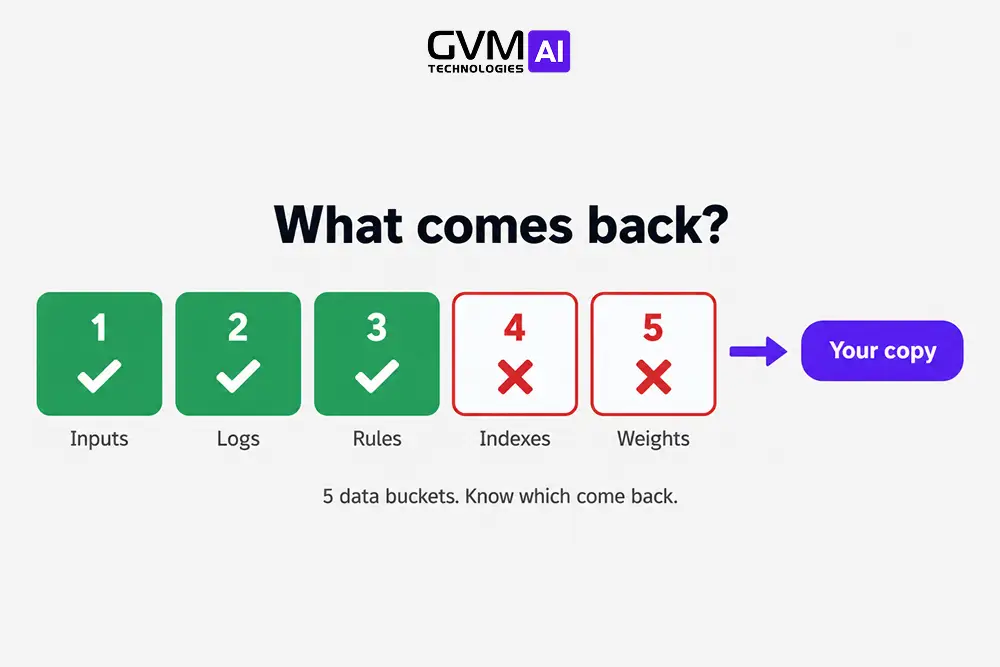
Your AI data sits in 5 buckets: raw inputs, conversations, configuration, derived indexes, and model weights. The first 2 usually come back, the third depends on your contract, and the last 2 rarely do.
| Bucket | Examples | Get-back odds | What to ask for |
|---|---|---|---|
| 1. Raw inputs | PDFs, FAQs, product feeds, contact lists | High | Originals, if you lack your own copy |
| 2. Conversations | Chat logs, call transcripts, tickets | High to medium | CSV or JSON with timestamps |
| 3. Configuration | System prompts, rules, flows, approved answers | Medium to low | A plain-text copy of each item |
| 4. Derived indexes | Embeddings, vector stores, fine-tune adapters | Low | Source files and chunk settings |
| 5. Model weights | The vendor’s base model and any tuned copy | Almost never | Nothing; plan to rebuild |
The 3 buckets that usually come back
Raw inputs are yours because you made them. The risk is a dashboard holding the only copy, so confirm originals sit in your own storage first.
Conversation logs usually export as CSV or JSON. Raw JSON from 1 platform rarely loads into another, so convert the important logs to plain text.
Configuration is the bucket owners forget. Rules and approved answers live in builder screens, so copy them by hand into 1 document. That takes about 30 minutes, and no export button does it for you.
Teams that migrate a long-running assistant tend to find a curated summary and a written rules file carry over better than raw history. A new model can only read so much at once, as how AI agents store context explains.
The 2 buckets that rarely come back
Embeddings are a numeric index of your documents that lets a bot search them. They rebuild from your source files, and the cost is small.
Per a contract comparison by Beri, re-embedding 10 billion tokens costs $200 to $1,300 at OpenAI’s October 2026 rates. By that math, a 1-million-token small-business knowledge base costs roughly 2 to 13 cents. Missing source files are the real problem, as RAG versus fine-tuning shows.
Fine-tuned weights and base models stay with the vendor, so AI data portability ends there. Keep your training examples, the question and answer pairs, so another model can repeat the tuning.
GVM Technologies AI grounds each bot in the client’s approved documents, so the rebuild path always exists.

What the law says about AI data portability
AI data portability rights in privacy law cover personal data, not your business setup. GDPR Article 20 and California’s CCPA protect people’s data. For a business customer, the contract decides the rest.
GDPR Article 20 covers personal data you provided
GDPR Article 20 lets a person receive their personal data in a structured, machine-readable format. It applies when processing is automated and based on consent or a contract. The vendor generally must answer within 1 month.
The right is generally read to cover data you provided and data observed from your use, such as logs. Data the vendor derived, like embeddings or profiles, usually falls outside it.
US and EU rules leave the rest to your contract
A legal review by Accord Shield found no AI-specific law in Arizona, California, or Texas that guarantees portability or deletion timelines. Those points must sit in the agreement.
In the EU, the Data Act requires cloud providers to drop switching charges, including egress fees, from January 12, 2027. Whether an AI tool counts as a covered service varies, and a US-only business may see no benefit.
What happens after you cancel: the deletion clock
Cancelling stops billing and losing access ends your login. Deletion is a third event, on a date set by the vendor’s terms. Those 3 dates form the deletion clock, and your AI data portability window sits between the first and the last.
Three dates, not one
Ask the vendor for all 3 dates in writing:
- Date 1: the day the contract ends
- Date 2: the day your access stops, often the end of the billing period
- Date 3: the day your data is deleted, with backups often lagging behind
Export your data while the account is still active. After access ends, you work against a clock the vendor has no duty to pause.
What major API vendors promise
Standard terms give you between 0 and 90 days. This table follows Beri’s October 5, 2026 reading of each agreement:
| Vendor | After termination |
|---|---|
| OpenAI | Deletes within 30 days; the return right covers personal data only |
| Anthropic | Returns data only if you ask within 30 days |
| Microsoft Foundry | 90 days to extract data from a disabled account |
| Google Vertex AI | Ask during the term; deleted after up to 30 days of recovery, 180 days at most |
| Amazon Bedrock | 30 days, if all amounts due are paid |
These are business API agreements. Consumer chat apps and no-code chatbot platforms set their own terms, so confirm current wording before relying on any row.
Backups, sub-processors, and training
Deleting your account does not clear backups, logs, or sub-processors, the outside companies a vendor uses. Ask for written certification covering all 3.
Deleting your files also does not prove a model forgot what it learned from them. Ask in writing and treat a vague answer as the answer. Self-hosted setups sidestep much of this, as on-premise versus cloud AI agents compares.
Tools your staff joined on their own hold copies too, as shadow AI in the workplace explains.
How to get your data back: a 7-day AI vendor exit plan
To leave an AI vendor safely, request your data while the account is active and name each bucket in writing. Then test what arrives, revoke access, and ask for deletion proof. The vendor’s reply time is the only part you cannot control.
Day 1: Inventory what you put in
List every upload, rule, flow, integration, and connected account. Mark where each original lives. An AI agent readiness checklist helps map the dependencies.
Then score your AI data portability: 1 point for each bucket you could rebuild today without the vendor. A score of 2 or less means start now. In a GVM Technologies AI review, this inventory is the first thing checked.
Day 2: Send the written request
Email the vendor’s support and legal contacts with the subject “Data export and deletion request, account [ID]”. Include these 5 asks:
- Export of conversations, files, prompts, rules, flows, approved answers, and integration settings in CSV, JSON, or Markdown
- The 3 dates of the deletion clock, in writing
- Confirmation that backups and sub-processors fall under deletion
- Confirmation that no training use continues after termination
- A named contact and a ticket number
Days 3 to 5: Test the export
Open every file. Load 10 sample answers into a spreadsheet and confirm they read cleanly.
A ZIP of JSON that only the vendor’s own tool can read is lawful and useless. Rerun 30 real customer questions, each with an approved answer, on any replacement to prove AI data portability is real.
Day 6: Revoke keys and move your channels
API keys and integrations can keep working after a plan lapses. Revoke them, reset connected passwords, and remove webhooks.
Move your WhatsApp number, domain, and website widget so no customer reaches a dead bot. Review what the bot could see in AI agent access to customer data.
Day 7: Ask for deletion proof and keep a record
Request written confirmation that deletion happened. Store your export in 2 places and log every date and ticket number.
When the vendor shuts down, sells, or goes silent
A shutdown or sale shortens or removes your AI data portability window, because the contract no longer sets the pace. The only safe copy is one you already hold.
1. Shutdowns give days, not months
Humane announced its sale to HP on February 18, 2025. Its AI Pin devices stopped working 10 days later, on February 28, and users were told to back up data before stored files were deleted.

Build the fallback before you need it, starting with an AI business continuity plan.
2. Sales and bankruptcies treat your data as an asset
A bankruptcy court approved the $305 million sale of 23andMe to TTAM Research Institute in June 2025. The buyer pledged to honor privacy policies and offer deletion options.
Many owners assume a “we will not train on your data” promise survives a sale. It survives only if the contract binds the buyer, so ask for a clause that ends the agreement and triggers deletion when the vendor changes owners.
3. A silent vendor still owes you the export
If your vendor stops replying, send formal written notice to the contract’s notice address. Cite the clause and the date, and for personal data cite Article 20 or a CCPA request.
Silence after launch often signals deeper trouble, covered in AI vendor red flags after launch. For large claims, talk to counsel, since this guide is not legal advice.
AI data portability by vendor type, and the mistakes to avoid
AI data portability depends on who holds the master copy. A rented platform holds more of your setup than a model account does, and an agency build is only portable if your contract hands over the code, prompts, and hosting.
| Vendor type | Usually recoverable | Usually stuck | First request |
|---|---|---|---|
| No-code chatbot platform | Logs, uploaded files | Flows, rules, analytics | Screenshots of each flow, plus its logic in plain words |
| Custom GPT or model subscription | Chat history, files | Custom instructions in 1 account | Copy instructions by hand |
| API provider | Files, fine-tune training data | Tuned model, vector store contents | Dataset and file export |
| Agency custom build | Everything, if the contract says so | Code, prompts, hosting held by the agency | Repository handover |
| AI inside existing software | Your own records | Default AI settings, derived summaries | Data terms and opt-out |
Agency builds: ownership is a contract line
A custom system is only portable if the agency hands it over. Before you hire any builder, including GVM Technologies AI, get 4 answers in writing:
- Who owns the code and prompts?
- Where does the knowledge base live?
- What hosting continues after you leave?
- How many handover hours are included?
The wider trade-offs sit in agency versus in-house AI team.
5 mistakes that cost owners their data
| Belief | Reality |
|---|---|
| “I own it, so I can export it” | Ownership is not delivery. Without a clause, no export of rules or indexes is owed. |
| “Cancelling wipes everything” | Cancelling stops billing. Data can sit in backups for 30 to 180 days. |
| “The export button means I can leave” | Logs export. A working setup usually does not, so test AI data portability first. |
| “A staff member set it up on their login” | A personal account may leave the business with no admin rights. Move it to a company account. |
| “The vendor has my backup” | Vendor deletion is final. Your own copy is the only backup. |
FAQs
1. Can I get my data back after I cancel an AI subscription?
Often, but only inside a short window. Many vendors give 30 days, and some require you to ask first. Export your data before you cancel.
2. Does GDPR guarantee AI data portability for my knowledge base?
No. Article 20 covers personal data you provided or generated through use. Your knowledge base, rules, and indexes depend on the contract.
3. Who owns the answers my AI vendor generated for me?
Most terms give you rights to outputs, but ownership is not delivery. Confirm in writing that you may use outputs after you leave.
4. How long does a vendor keep my data after I leave?
Between 0 and 180 days in major agreements, with backups often lagging. Ask for the deletion date in writing.
5. Can I force an AI vendor to remove my data from its model?
Not reliably. Deleting files does not prove a trained model forgot them. Ask how the vendor handles this and keep the answer.
6. What happens to my data if my AI vendor goes bankrupt?
Your data may be sold with other assets, subject to the contract and the buyer’s promises. Keep your own copy and request deletion in writing.
Test your AI data portability before you leave
Waiting to test AI data portability means learning what you cannot recover on the day access ends. By then a 30-day window is already running, and a vendor sale could shorten it to 10 days.
Use this 4-week AI vendor exit plan:
- Week 1: Inventory the 5 buckets and copy your rules and approved answers into 1 document.
- Week 2: Send the written request and collect the 3 deletion-clock dates.
- Week 3: Test AI data portability by running your 30 test questions on a second tool.
- Week 4: Revoke keys, move your channels, and store the copy in 2 places.
Run the same test every quarter, because a vendor’s terms can change before you do.
Get a free AI data portability review from GVM Technologies AI
Left untested, a cancellation or a vendor shutdown leaves you rebuilding from memory. A GVM Technologies AI review gives you a plain read on:
- Where your uploads, rules, and logs live today
- Your AI data portability score across the 5 buckets
- What to put in a written export and deletion request
- Whether a cheap fix is enough or a rebuild is worth it
Audit first, no pressure to rebuild.